🍬 HTML Section Sugar
Introduction
We can think about the section element as a standalone piece of the document. These are usually generic, where there isn't a more fitting semantic element to use. It's important not to swap out all div elements for section elements. In most use cases, a section element should always have a heading element to describe the purpose of the section. Some nice questions to ask yourself if you should be reaching for a section element:
- Can you describe the content area with a meaningful heading? If the answer is no, a div element is likely the better option.
- Is the element only meant to act as a container, or for attaching some styles to? If the answer is yes, then a div element is likely the better option.
An example using the section element might look something like this:
1<article>2 <h1>Web Accessibility</h1>3 <section>4 <header>5 <h2>Introduction</h2>6 <h3>What is accessibility?</h3>7 </header>8 <p>In short, accessibility is...</p>9 </section>10</article>
This introductory "section" you're reading right now is in fact a section element with a h2 element.
Aria Roles
Aria roles help provide semantic meaning to web content, enabling screen readers to correctly display information and interactions that meet a users' expectations.
All semantic elements automatically have a role added to them. For example, the nav element automatically gets a navigation landmark role added. Landmark roles help identify and structure a web page for assistive technologies. By using semantic HTML elements and aria roles, we help create structural information for screen readers to provide keyboard navigation to important content landmarks on a webpage. By doing this, users can quickly and easily jump to the landmark areas of our site.
Section Elements as Landmarks
I've always thought section elements had a landmark role automatically added. Well, it turns out they don't. Creating too many landmarks can make it super noisy for assistive technology users. To avoid many unnamed landmark regions throughout a document, developers must explicitly define sections as landmarks with meaningful names. Without any additional aria attributes, the section element is similar to the div element (for the most part!). The section element gets Role: section added to the accessibility tree, but that's vague and doesn't offer any additional information or guidance to screen reader users! 😞
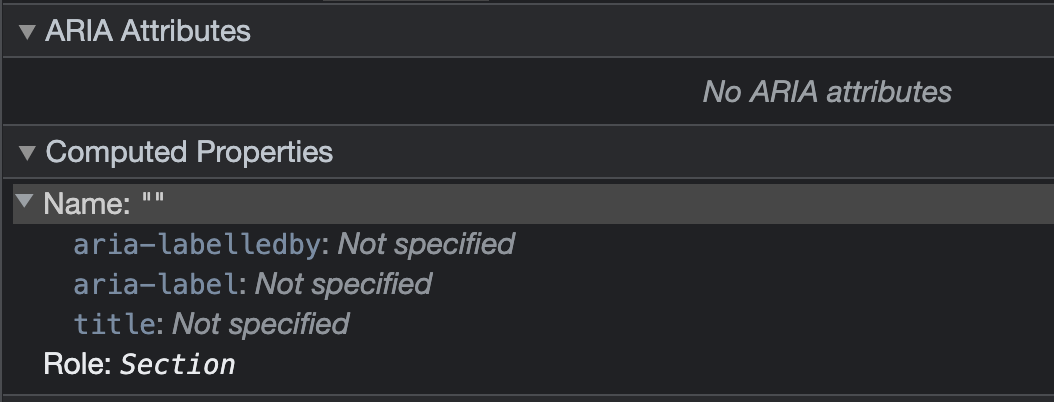
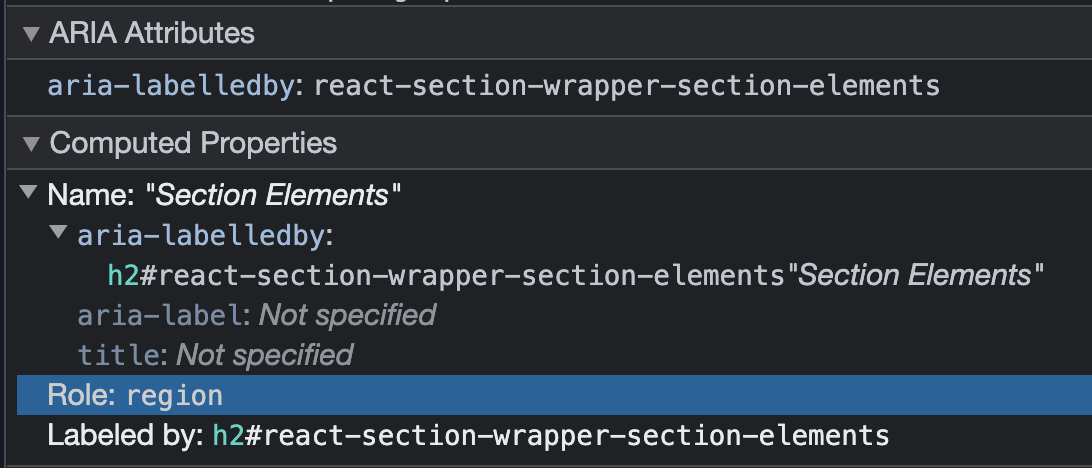
To define section elements as landmarks with meaningful names, you need to add an additional attribute. Use either an aria-labelledby or an aria-label attribute. Doing this will add a region landmark role.
The region role helps identify areas of a document the author deems significant. The region role is a generic landmark used to help assistive technologies navigate when none of the other landmark roles are appropriate.
Lightweight React Wrapper Solution
I've created a lightweight React wrapper with some required TypeScript properties to create accessible landmark regions with meaningful names.
1import React, { FC } from 'react';23type HeadingLevel = 1 | 2 | 3 | 4;45interface Props {6 headingLevel: HeadingLevel;7 headingID: `${string}-${string}`;8 headingTitle: string;9 className?: string;10 headingClassName?: string;11 children: ReactElement | ReactElement[];12}1314const SectionWithHeading: FC<Props> = ({15 headingLevel,16 headingID,17 headingTitle,18 children,19 className = '',20 headingClassName = '',21}) => {22 const Heading = `h${headingLevel}` as keyof JSX.IntrinsicElements;2324 return (25 <section aria-labelledby={headingID} className={className}>26 <Heading id={headingID} className={headingClassName}>{headingTitle}</Heading>27 {children}28 </section>29 );30};3132export default SectionWithHeading;
The snippet for using the wrapper component is below.
1<SectionWithHeading2 headingID="react-section-wrapper-component"3 headingTitle="Lightweight React Wrapper Solution"4 headingLevel={2}5>6 <p>7 I've created a lightweight React wrapper...8 </p>9</SectionWithHeading>
Extra Reading
More articles on web accessibility:
- 🌐 Web Accessibility
23 min read 📖
- 🪓 Google ZX & Axe CLI
4 min read 📖
- ✋ Accessible Emojis
5 min read 📖
- 📏 Layouts PX vs REM
5 min read 📖
Thanks for reading! Time for one more?
const Btn = ({ onClick, children }) => (<button onClick={onClick}>{children}</button>)
🧱 React Component Composition
20 Nov 2022 • 📖 10 min read✏️ Updated 15 Mar 2026Understanding component composition in React with a simple food orders app.
const logger = () => console.log('yo!')const theJoeCodes = () => logger()theJoeCodes()// call stack: theJoeCodes → logger → log
⚙️ JS Runtime Env
20 Feb 2022 • 📖 15 min read✏️ Updated 15 Mar 2026Understanding the JavaScript Runtime Environment with a focus on the Event Loop and Message Queues.