✋ Accessible Emojis
Introduction
I recently installed eslint-plugin-jsx-a11y as a development dependency and added the recommended strict settings to my eslint configuration. Up until now I've been relying heavily on @axe-core/react during local development for accessibility guidance and auditing, alongside other browser tooling like Lighthouse.
The linting plugin catches accessibility issues in your editor before they reach production.
Errors
Asides from the faster feedback on accessibility concerns in my code editor, eslint-plugin-jsx-a11y has caught new issues that react-axe never surfaced before in the browser.
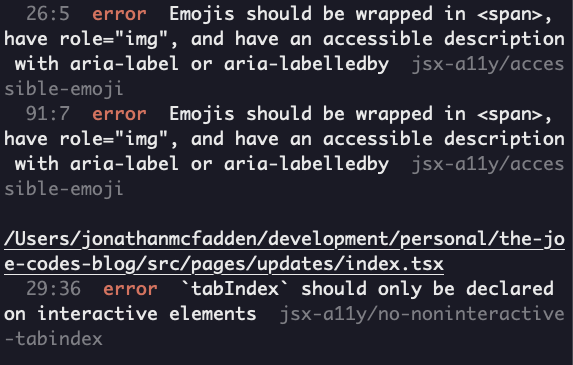
You can see the output from the linting run with just plugin:jsx-a11y/recommended turned on below.
The linting run output is super noisy with Emojis should be wrapped in span error messages. I had no idea we needed to wrap emojis in span elements with role and aria-label attributes.
Without Attributes
Screen readers use the emoji name as the default audio output when using text to audio software, which is much better than I had initially thought. However, emojis may be translated differently by different screen readers without role and aria-label attributes.
Without providing clear instructions through attributes, we could end up creating the wrong context entirely. It's almost like watching a film with slightly incorrect translations.

VoiceOver
Here are a few silly example sentences with VoiceOver (macOS screen reader software) using the "raise hand" emoji without role and aria-label attributes. The bottom statement is the only one that really makes sense when announced by this screen reader.
I passed my driving test, high five! ✋
I failed my driving test, I forgot to stop at a red light! ✋
I failed my driving test, I let go of the steering wheel to ask a question. ✋
Emoji Wrapper Fix
1import React, { FC } from 'react';23interface EmojiArgs {4 label: string;5 ariaHidden?: boolean;6 emoji: string;7}89const Emoji: FC<EmojiArgs> = ({ label, emoji, ariaHidden = false }) => (10 <span11 className="emoji"12 role="img"13 aria-label={label}14 aria-labelledby={label}15 aria-hidden={ariaHidden}16 >17 {emoji}18 </span>19);2021export default Emoji;
1<Emoji emoji="✋" label="high five" />2<Emoji emoji="✋" label="stop hand" />3<Emoji emoji="✋" label="raise hand" />
Span Element
The span element is perfect to use since it represents an inline piece of content with no semantic meaning. A blank canvas we can add accessibility attributes to for our screen reader to interpret.
Role Attribute
The role HTML attribute helps screen readers inform the user about the element they've encountered on the page. In this scenario, the img role is used to treat the emoji as an image.
Aria-label Attribute
Aria labels are strings used to describe element content to the user. Aria labels should be used when no text is visible on the screen.
Aria-hidden Attribute
The aria-hidden attribute allows us to expose or hide non-interactive content from being created in the accessibility tree / accessibility API. The big list of emojis at the bottom of this article doesn't need to be exposed to assistive technology, it's purely "decorative". Adding aria-hidden="true" to this element removes it (and all of its children) from the accessibility tree.
More Errors
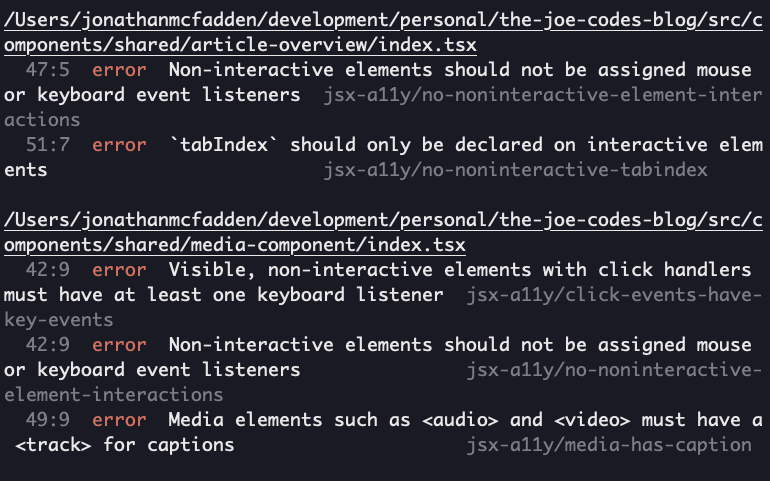
Additional accessibility issues were also caught, mainly around the interactivity of elements. For article overviews, I'm using article elements with onClick and onKeyPress event listeners. I'm not sure how to get around this error, an interactive element like a button isn't semantically correct considering I need to display additional details like keywords, published dates and average read times. I even had a look at the DOM structure over on Kent C. Dodds new site, which seems to be using mostly div elements on the blog section 🤷♂️.
Final Thoughts
I really wish I had set up accessibility linting sooner and encourage anyone reading this to add the eslint-plugin-jsx-a11y plugin to your eslint configuration.
That's it for this article. As you can see from the linting output, I've got quite the exciting task ahead of me to update all the emojis used across this site to use a React emoji component... 🤦♂️
Thanks for reading! Time for one more?
const urls = routes.map(r => `${baseUrl}${r}`)await Promise.all(urls.map(url => $`npx axe ${url}`))
🪓 Google ZX & Axe CLI
16 Oct 2021 • 📖 4 min read✏️ Updated 15 Mar 2026Running axe-core CLI with Google ZX.
Host github-workIdentityFile ~/.ssh/id_workHost github-personalIdentityFile ~/.ssh/id_personal
🔑 GIT SSH Config
05 Oct 2021 • 📖 4 min read✏️ Updated 15 Mar 2026Managing private SSH keys across work and personal GIT repositories.