🛹 Sketchy - Skateboard Companion App
Introduction
I shipped Sketchy, my skateboard companion app, to the App Store and Play Store this year, and I wanted to write up the tech stack while it's all still fresh in my head. Sketchy is built on Expo SDK 55, React Native 0.83, expo-sqlite for local persistence, and a webview-rendered Leaflet map backed by free OpenStreetMap data. Everything in the app, including the offline trick journal and the spot finder, runs without a single piece of paid infrastructure (AI costs aside 😭).
Updated October 2026: there's been a few big releases since I first wrote this. 1.4 added Trick of the Week (two tricks every week, a warm-up and an ender), 1.5 added around 90 new tricks, and 1.6 brought native iOS liquid glass sheets and switches through @expo/ui (with Jetpack Compose ones on Android), a new font, and a much better Skate Map with 30,000+ spots preloaded. I've rewritten the map section for that. Still on Expo SDK 55 and RN 0.83, so the rest of the stack below hasn't changed.
I've used Expo for a while (I wrote about Expo Router previously) and most of the stack below is familiar territory for me, so on Sketchy I leaned hard into keeping the ceremony low. The whole release toolkit is a handful of bun scripts in package.json: bun run version:patch bumps the semver, bun run gh-release:push tags and pushes, bun run eas-ota:prod fires a JS-only update. No release-please, no merge-train orchestration, no enterprise song and dance. In the ideal world it's just push to main and ship, and on a solo project you can get pretty close to that.
By 2026, assuming AI was involved in a new release is basically the default, but it'd feel strange not to acknowledge the process behind Sketchy. The app was brought to life using Claude (Opus) as the engine, while I steered the direction. With five years of mobile development, two decades of skateboarding, and the recent years of my career immersed in the React Native and EAS/Expo ecosystem, I had the context needed to shape the tech stack and refine the UX. For me, "vibe coding" works because I don't rely on Claude for the architectural calls; I rely on it to handle the "boring middle." This allows me to focus on the parts that actually shape the product: getting Sketchy into the hands of skaters - myself included, once I've fully recovered from my nasty boxing injury and surgery for a distal bicep tear (going well so hoping to be on the board again for summer! ☀️ 🛹☀️ ). After every feature landed, I'd go back through the output, pull out any learnings, and course-correct the inevitable "hallucinations" and silly decisions Claude makes when it goes a bit crazy.
The major new/interesting pieces for me on this project were RevenueCat for the in-app purchases, Expo SDK 55 + expo-sqlite for local persistence, React Native new architecture, React 19 + react compiler, and giving PostHog a whirl for analytics.
RevenueCat itself was two halves: the React Native SDK side, which was the easy half (drop it in, call Purchases.configure, wire the upgrade screen up), but the store-side plumbing wasn't fun and took a little bit of time to finish. Creating products in App Store Connect and Play Console, generating Google Cloud service-account keys, filling out tax / banking / agreement forms, and testing the actual purchase flow with real money before TestFlight reviewers could touch it ate the better part of a day or two. It could have been faster, but i got distracted with fun features lol.
The stack at a glance
Sketchy is the latest version of a skateboard companion app I started four years ago, back when I was just getting into mobile development. The original web app still lives at skate-dice.com, the mobile sibling was called SkateDex, and looking back at the early designs and the original feature set, you can tell exactly how far both my taste and the React Native tooling have come since. The version on the stores today is a fresh, ground-up rebuild on the current Expo SDK, and I'm stoked on where it's landed.
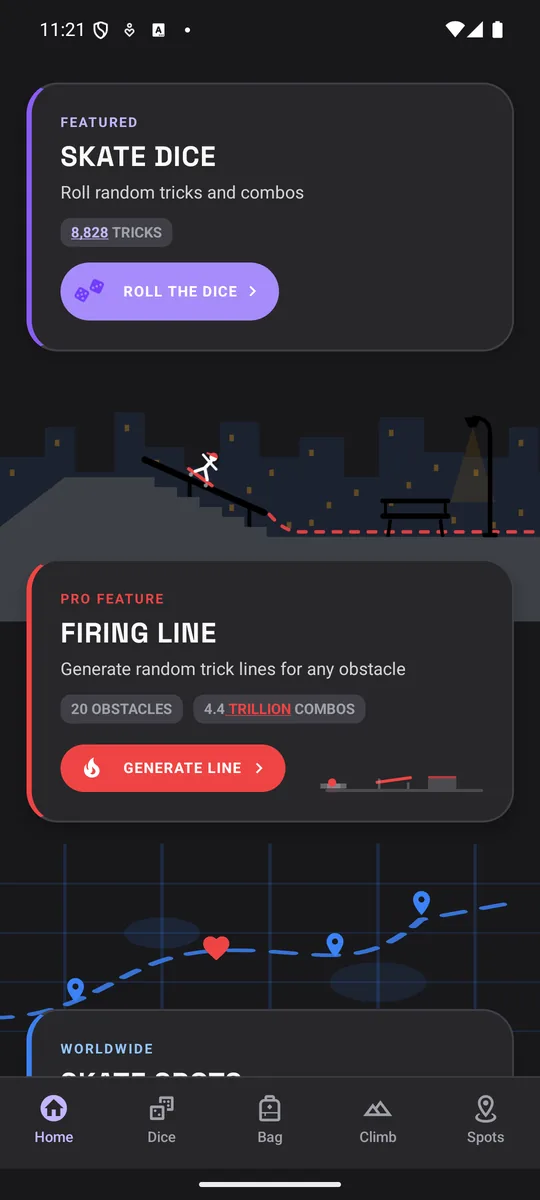
What it is now is a multi-tab companion app with an offline trick journal, a skate-spot finder, a daily challenge notification, a quiz, a level-based skill ladder, and an optional Pro upgrade that unlocks the extra 🔥 content. The footprint is intentionally small. Everything below sits on top of Expo SDK 55 and React Native 0.83, and Apple Developer and Play Console are the only ongoing paid services; Sentry, PostHog, RevenueCat, and EAS all sit comfortably inside their free tiers for an app this size.
- expo-router
- react 19
- react compiler
- context + useReducer
- reanimated 4
- worklets-core
- gesture-handler
- flash-list
- flash-calendar
- react-native-webview
- leaflet (inside webview)
- RN 0.83.6
- Hermes (JS engine)
- JSI (sync JS / native)
- Fabric (renderer)
- TurboModules
- expo-sqlite
- expo-location
- expo-sensors
- expo-notifications
- expo-updates
- expo-haptics
- EAS Build (iOS + Android)
- EAS Submit
- Sentry
- PostHog
- RevenueCat
A few of those choices are worth a sentence on their own. Expo SDK 55 brings React 19 and React Native 0.83.6. Since RN 0.82 the New Architecture is the only architecture, so on 0.83 there isn't a "legacy mode" to fall back to even if you wanted one. The React Compiler is enabled via experiments.reactCompiler: true in app.config.ts, so I get auto-memoisation across the whole app without writing a single useMemo. Reanimated 4 brings worklets-core and a meaningful step up in animation performance, especially on Android.
I wrote about Expo Router's file-based routing and the managed workflow in a separate article, so I'll skip the basics here and assume that if you've worked with Next.js you can read an Expo Router app/(tabs)/index.tsx file and know what you're looking at.
What "the New Architecture" actually means
The phrase "New Architecture" gets thrown around in Expo and React Native release notes a lot, and for a long time it felt like one of those things you opt into, flip a flag for, then chase obscure native build errors until you give up. As of React Native 0.76 it became the default, and as of 0.82 it became the only architecture: the legacy bridge has been removed and newArchEnabled=false is now silently ignored. Sketchy ships on RN 0.83, so it's a generation past the point where any of this is optional.
The pieces, in plain English
The "New Architecture" is an umbrella term covering four moving parts that each replace something older. You don't write code against most of them day to day, but knowing roughly what each one does makes the React Native release notes a lot easier to follow.
Hermes
Hermes is the JavaScript engine that ships inside React Native. Instead of running your TypeScript source through a general-purpose engine like V8 or JavaScriptCore at app launch, Hermes pre-compiles the bundle to bytecode at build time. The app starts faster because the JS engine is executing instructions instead of parsing source, and the runtime memory profile is smaller. RN 0.82 also added experimental support for Hermes V1, which is the next-generation evolution; that's still opt-in, and Sketchy is on the stable Hermes that ships by default.
JSI (JavaScript Interface)
JSI is the layer that lets JavaScript call native code directly. The old way, called the bridge, sent every native call through a queue, encoded the arguments as JSON, ferried them to the native side, decoded them there, ran the native function, encoded the result back, and posted it to a callback on the JS side. That was async, batched, and slow. JSI replaces all of that with a typed C++ interface that JS can call synchronously. When you write SQLite.openDatabaseSync(...) and it actually returns synchronously, that's JSI doing the work underneath.
TurboModules (and what they replaced)
Before TurboModules, the way React Native talked to a native module was the older Native Modules system. Native Modules were registered eagerly at app startup (every module loaded whether you used it or not), every method call went across the asynchronous JSON bridge, and the JS-side types were hand-written and prone to drifting out of sync with the native implementation. They worked, but the cost was startup time, latency, and silent type bugs.
The implementation language is the same on both: ObjC or Swift on iOS, Kotlin or Java on Android. What changed is how the API surface is declared, how calls cross the boundary, and when the module actually loads. Easiest to read it side-by-side, before and after. The JS callsite first:
1// ───── BEFORE: Native Modules (legacy bridge) ─────2import { NativeModules } from 'react-native'34const { MyModule } = NativeModules56// every call is async, JSON-encoded over the bridge,7// and the JS-side types are whatever you hand-write8const result = await MyModule.add(1, 2)
1// ───── AFTER: TurboModule spec (NativeMyModule.ts) ─────2import type { TurboModule } from 'react-native'3import { TurboModuleRegistry } from 'react-native'45export interface Spec extends TurboModule {6 add(a: number, b: number): number7}89export default TurboModuleRegistry.getEnforcing<Spec>(10 'MyModule',11)1213// callsite is just a typed function call:14// const result = MyModule.add(1, 2)
On the JS side the old way was a loose handle off NativeModules with whatever types you typed yourself. The new way is a TypeScript spec file: you declare the shape once, Codegen builds the bindings from it, and your editor's autocomplete is now sourced from the same place the native side compiles against.
The native side is the same language but with less ceremony around the method, before and after:
1// ───── BEFORE: Native Module on iOS (MyModule.m) ─────2@implementation MyModule3RCT_EXPORT_MODULE();45RCT_REMAP_METHOD(add,6 a:(double)a7 b:(double)b8 resolver:(RCTPromiseResolveBlock)resolve9 rejecter:(RCTPromiseRejectBlock)reject) {10 resolve(@(a + b));11}12@end
1// ───── AFTER: TurboModule on iOS (MyModule.mm) ─────2@implementation MyModule3RCT_EXPORT_MODULE()45- (NSNumber *)add:(double)a b:(double)b {6 return @(a + b);7}89// Codegen produces NativeMyModuleSpecJSI from the .ts spec10// and you hand back an instance from getTurboModule(...)11@end
Old style needed an explicit RCTPromiseResolveBlock / RCTPromiseRejectBlock pair just to return a value, since every call had to be async. New style is a regular method that returns inline; Codegen produces the JSI plumbing alongside it.
The cost difference at runtime stacks up in the call path itself:
- 01JS callsiteMyModule.add(1, 2)
- 02Encode argsArguments serialised to JSON
- 03Async bridgeJSON queued, ferried to native thread
- 04DecodeNative side parses JSON back into args
- 05RunMethod executes
- 06Encode resultResponse serialised, posted to JS callback
- 01JS callsiteMyModule.add(1, 2)
- 02JSI invokeTyped C++ call, no serialisation
- 03Run + returnResult lands in JS in the same tick
It goes from six steps down to three, and the three that are left are cheaper. The method signatures are generated by Codegen from a single TypeScript spec rather than written by hand on each side, which kills the whole class of "the native module accepts a string but the JS thinks it's a number" silent bugs the old system used to swallow.
Codegen
Codegen is the type-safety machinery that ties JS and native together at build time. You write a TypeScript spec for a native module or a Fabric component, and Codegen produces the matching C++, Java, and Objective-C bindings from it. Both sides come out of the same source of truth, so they can't drift. It's the part of the New Architecture you don't see day-to-day if you're an app developer, but it's the reason TurboModules and Fabric are type-safe end to end rather than relying on convention.
Fabric (the renderer)
Fabric is the rewritten React Native renderer. Where the legacy renderer ran layout (Yoga) on the JS thread and shadow tree mutations across the bridge, Fabric runs them on a dedicated C++ thread and talks to React directly via JSI. The biggest day-to-day consequence is that concurrent React features like Suspense, transitions, and useDeferredValue work properly on native: a busy list update doesn't block paint, and a transition won't accidentally show its fallback when paired with a Suspense boundary. The React Compiler's auto-memoisation also depends on Fabric to avoid double-rendering nodes the compiler has already marked stable.
Side by side, the legacy stack had a single async bridge plus the Paper renderer between JS and native, and the new stack splits that work across the four pieces above:
- react 17 / 18
- app code (TSX)
- hermes or JSC
- iOS (ObjC / Swift)
- Android (Kotlin / Java)
- react 19
- app code (TSX)
- react compiler
- hermes runtime
- iOS (ObjC / Swift)
- Android (Kotlin / Java)
- C++ shared core
- BridgeAsync, batched, JSON-serialised
- Native ModulesEager-loaded, hand-typed signatures
- RendererPaper, layout (Yoga) on JS thread
- Concurrent ReactLimited interop, fallback bugs
- JSIDirect sync JS / native calls
- TurboModules + CodegenLazy-loaded, type-safe end to end
- FabricC++ thread renderer, concurrent-safe
- Concurrent ReactSuspense + transitions land cleanly
The practical difference for an app like Sketchy is that synchronous native calls are actually synchronous, which is the thing expo-sqlite leans into hard. The whole journal database is read and written with execSync, getAllSync, and runSync calls, which only really works because there's no JSON-serialised bridge round-trip in the way. On the old bridge, that would have been a UI thread killer the moment the database held more than a handful of rows.
If you're upgrading an older app and you're still on the legacy architecture, the safest path is the one the React Native team recommends: get to RN 0.81 or Expo SDK 54 (the last versions that allow the legacy architecture), enable the New Architecture there, then move forward to 0.82 or later.
Turning it on isn't a magic perf button 🧙♂️🪄
I see this framed wrong all the time, so it's worth saying: flipping the New Architecture flag from off to on does not, by itself, make your app instantly "blazingly fast." The React Native team's own benchmark write-up shows gains in the 1 to 40 percent range on synthetic scenarios depending on platform and component, and they explicitly note that they don't expect significant real-world perf gains from migration alone 🤷.
What the New Architecture actually does is unblock the next tier of work in the React Native ecosystem. Reanimated 4's worklets-core and Flash List 2.x both require it. The React Compiler's auto-memoisation, concurrent React features like Suspense and useTransition, and the synchronous APIs in expo-sqlite, MMKV, react-native-skia, and vision-camera all sit on JSI and are at their best when the rest of the stack is on the new arch too. The speed-up Sketchy actually feels comes from its own subset of those: Reanimated 4 driving every animation, Flash List replacing FlatList, the React Compiler handling memoisation, expo-sqlite's sync API on the journal hot path, and being deliberate about what runs on the JS thread vs the UI thread. The New Architecture is the starting line, not the finish 🚀.
The one place the migration does pay off pretty consistently on its own is on Android, especially older and low-end devices. Kraken's published data from their incremental new-arch adoption noted that render times got faster across the board, but the biggest gains were seen on the slowest devices, both in absolute and relative terms. That makes sense when you look at the pieces, since Hermes uses less memory on phones that were already short on it, JSI drops the JSON bridge cost that hit slow Android phones hardest, Fabric moves layout off the JS thread, and TurboModules only load when they're needed instead of all at startup. None of them is huge on its own, but together they make a noticeable difference on cheaper Android phones.
Turning the React Compiler on
The React Compiler is a build-time transform that figures out which values inside a component are stable and inserts the equivalent of useMemo and useCallback for you. On Expo SDK 55 you get it by adding a single flag to app.config.ts:
1export default ({ config }: ConfigContext): ExpoConfig => ({2 ...config,3 name: 'Sketchy',4 runtimeVersion: majorVersion, // OTA channel pinning5 experiments: {6 reactCompiler: true, // free perf, no code changes7 },8 plugins: [9 'expo-router',10 'expo-sqlite',11 'expo-sharing',12 'expo-updates',13 ['expo-location', { ... }],14 ['expo-sensors', { ... }],15 ['expo-notifications', { ... }],16 ],17})
The practical effect is that the compiler takes most of the memoisation decisions off your hands. New components in Sketchy don't reach for useCallback when a function is passed into a child, and they don't wrap derived values in useMemo unless there's a real reason. The trade-off is that you stop being able to read a component and tell at a glance which values are stable, which I'm OK with for an app this size, but I'd think harder about it on a larger codebase with multiple contributors and stricter performance budgets.
It's still flagged as experiments.reactCompiler in Expo SDK 55, and the reason is less "the compiler is buggy" and more "the compiler is stricter than the runtime ever was." The compiler enforces the Rules of React (no conditional hooks, no mutating props, no reading refs during render, no impure component bodies) and any pre-existing codebase that's been quietly violating those rules will start surfacing bugs once it's on. The compiler itself is stable enough to ship; the tooling around catching those violations ahead of time (eslint-plugin-react-compiler, the strict lint configuration) is what's still maturing, and the React team is being deliberately conservative about removing the flag while real codebases finish surfacing edge cases.
Nothing in Sketchy has visibly broken since turning the compiler on, but on a regulated or payments-related app I'd run eslint-plugin-react-compiler and read the bailout output before trusting auto-memoisation across every component.
The trick journal, stored in expo-sqlite
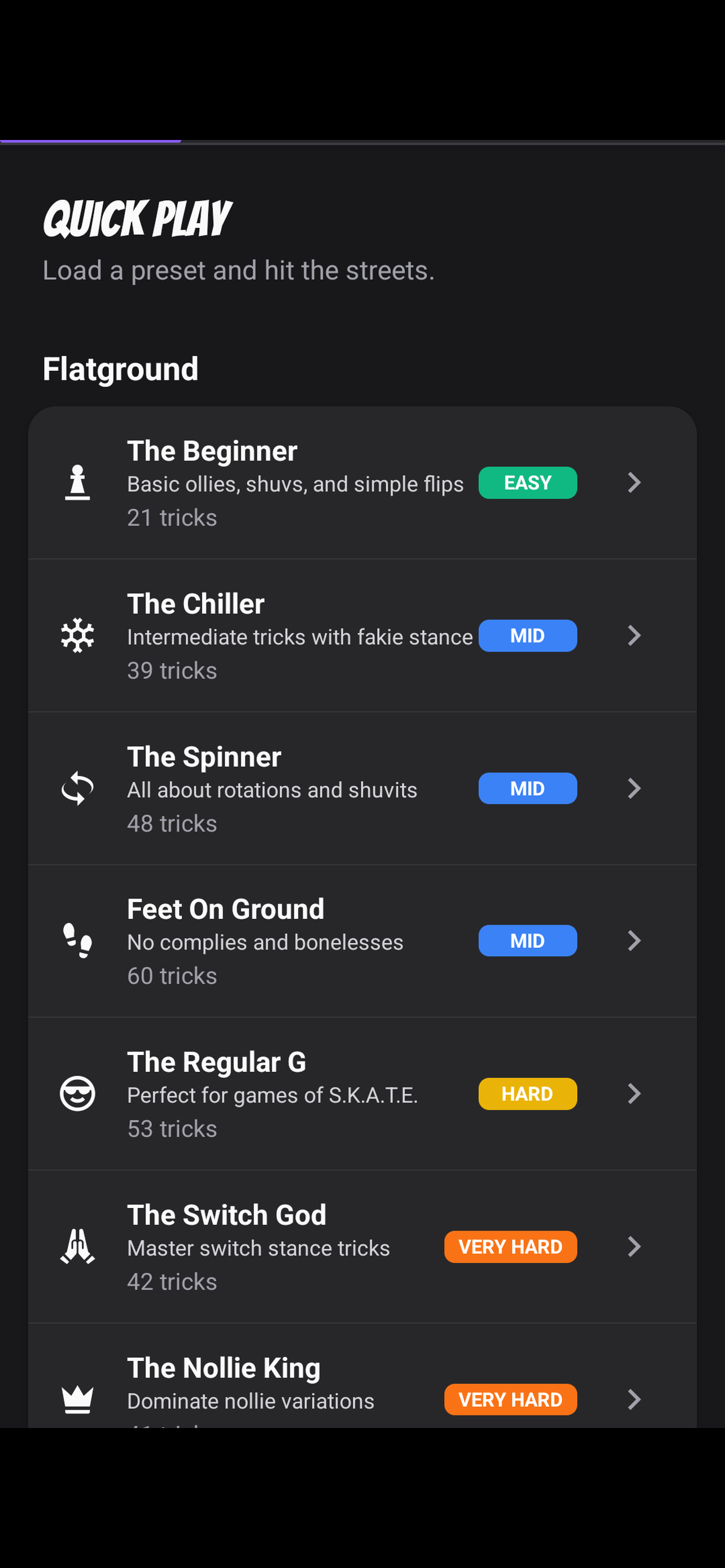
The journal is the most data-heavy screen in Sketchy. It's a calendar-driven log of every skate session, with a simple three-state status per trick (tried, landed, learnt). When a trick is marked as learnt it gets pinned to a permanent mastery list, and anything that's landed or learnt rolls up into a "bag of tricks" pool that the Quick Play screen draws from. It needs to be fast, offline, and resilient across app updates, and that ruled out anything more exotic than SQLite.
The whole database is four tables. sessions is the parent; session_tricks hangs off it with a unique constraint on (session_id, trick_name) so a single trick can't be landed twice in the same session. trick_mastery records the first time a trick was learnt across all sessions. bag_tricks is the read-optimised view that the dice and quick-play screens pull from.
- idINTEGERPK
- dateTEXT
- locationTEXT?
- notesTEXT?
- created_atTEXT
- idINTEGERPK
- session_idINTEGERFK
- trick_nameTEXT
- statusTEXT
- trick_nameTEXTPK
- learnt_atTEXT
- trick_nameTEXTPK
- added_atTEXT
- sourceTEXT
The expo-sqlite API in SDK 55 is fully synchronous, which is the thing that surprised me most coming back from the older callback-based version. There's no await, no transactions wrapper, no callbacks. You open a database handle once, set the SQLite settings you want, and read and write inline:
1import * as SQLite from 'expo-sqlite'23let _db: SQLite.SQLiteDatabase | null = null45const db = (): SQLite.SQLiteDatabase => {6 if (!_db) {7 _db = SQLite.openDatabaseSync('journal.db')8 _db.execSync('PRAGMA journal_mode = WAL')9 _db.execSync('PRAGMA foreign_keys = ON')10 _db.execSync(`11 CREATE TABLE IF NOT EXISTS sessions (12 id INTEGER PRIMARY KEY AUTOINCREMENT,13 date TEXT NOT NULL,14 location TEXT,15 notes TEXT,16 created_at TEXT NOT NULL17 )18 `)19 }20 return _db21}
Two SQLite-level switches worth turning on the first time you open a fresh expo-sqlite database. PRAGMA journal_mode = WAL lets reads and writes happen at the same time without blocking each other, and PRAGMA foreign_keys = ON means the ON DELETE CASCADE rules on session_tricks actually fire when a session is deleted. Both are off by default in SQLite.
Reads look like this. No async, no error boundary gymnastics, just a function that returns rows:
1export const getSessionsForMonth = (2 year: number,3 month: number,4): JournalSession[] => {5 const prefix = `${year}-${String(month).padStart(2, '0')}`6 return db().getAllSync<JournalSession>(7 'SELECT * FROM sessions WHERE date LIKE ? ORDER BY date DESC',8 [`${prefix}%`],9 )10}
And writes use the same shape. Sketchy's most common write is the upsert that changes a trick's status mid-session, which falls naturally out of the unique constraint on the table:
1db().runSync(2 `INSERT INTO session_tricks (session_id, trick_name, status)3 VALUES (?, ?, ?)4 ON CONFLICT(session_id, trick_name)5 DO UPDATE SET status = excluded.status`,6 [sessionId, trickName, status],7)
The performance budget for this kind of thing has gotten generous on the New Architecture. Sketchy hasn't been live long enough for me to stress the schema with a full year of real data, but the sync expo-sqlite path on JSI is fast enough on the small-to-medium reads I have run that I'm not pre-emptively reaching for pagination or caching. If you're coming from AsyncStorage, the difference in feel is meaningful once you're past the point where a single JSON blob is the right shape for your data.
When to pick sqlite, AsyncStorage, or MMKV
The three local-persistence options on React Native each fit a different shape of data, and the rule of thumb that's served me well is to pick by data shape, not by perceived complexity.
AsyncStorage is the default. Async API, one JSON blob per key. It's the right pick for tiny pieces of state where you'd otherwise be over-engineering: a feature flag, the last-seen onboarding step, a single user preference. The cost when you outgrow it is that you read and write whole blobs even when you only need one field, and any structure you put inside has to serialise and deserialise on every access.
MMKV is the same shape as AsyncStorage (key-value) but backed by memory-mapped files rather than per-call disk I/O. Public benchmarks put it well above an order of magnitude faster on reads and writes, and it has a sync API. If you've got a lot of small keys read on every screen mount and AsyncStorage is showing up in your perf traces, the migration is mostly a search-and-replace.
expo-sqlite wins the moment your data has actual structure: lists, foreign keys, aggregations, range queries. The whole reason the journal lives in sqlite is that rolling sessions and tricks up into mastery and bag-tricks tables is a relational problem, and reading "all sessions in March 2026 where the user landed at least one trick" is a query, not a JSON walk.
On Sketchy, the split is a bit messier than the rule of thumb would suggest. The journal is sqlite. The OSM spot cache (with its timestamp-based TTL) is AsyncStorage. The notification preference and daily challenge state are AsyncStorage. The quiz high-scores and per-category stats are AsyncStorage. The progression state (completed tricks, unlocked levels) is AsyncStorage too.
The quiz scores and progression state could (and probably should) live in sqlite, since they have structure: per-category stats, ordered level lists, completed-trick sets. They're in AsyncStorage because that was the fastest path while shipping the first version, and the data volume is small enough that the cost hasn't bitten yet. If I were shipping v2, that's the likeliest migration. The rest (TTL caches, single-key prefs) is in the right place.
Free maps, free spots: OpenStreetMap
The Skate Map shows skateparks, street spots and skate shops. Instead of Apple Maps or Google Maps (which are metered and need API keys), Sketchy uses the free OpenStreetMap ecosystem: a Leaflet map running inside a react-native-webview, free tiles and free spot data, so there's no bill at the end of the month.
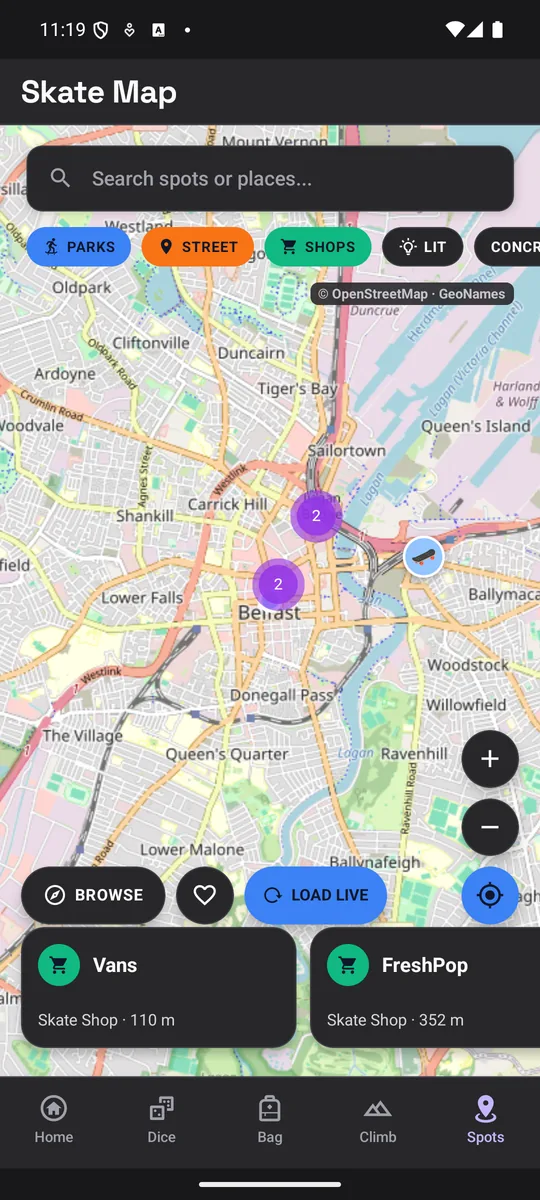
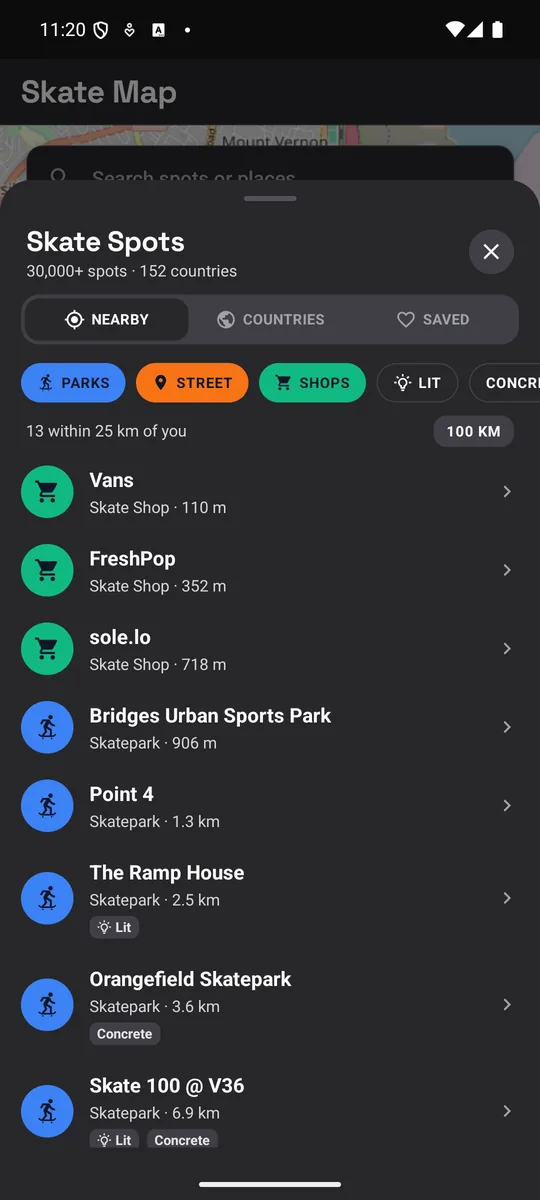
When Sketchy first launched, the map asked OpenStreetMap for spots every time you moved it, which was slow and a bit flaky. Now a script pulls every skate spot in the world (30,093 of them across 152 countries) into a single JSON file that ships inside the app, so the map is full the second it opens, even with no signal. It's fasttttt 🚀 The "Load live" button is still there if you want the freshest data for an area.
To keep the file small, each spot is a plain array instead of an object, so the key names aren't repeated 30,000 times. The whole world comes in at around 2.3MB:
1// one spot in world-skatespots.json2// id, name, type, lat, lng, country, area, extras3["n3614128829", "Skate Park", 0, -40.8215, -62.98063, "AR", 1, { "s": "asphalt", "l": "yes" }]
I run the script (bun run spots:update) roughly once a month before a release. A few big queries a year is fine on the public OpenStreetMap servers, whereas every user hitting them each time they moved the map wasn't.
EAS Build, EAS Update, EAS Submit
Sketchy has three build profiles in eas.json:
1{2 "build": {3 "development": {4 "developmentClient": true,5 "distribution": "internal",6 "android": { "buildType": "apk" }7 },8 "preview": {9 "channel": "preview",10 "distribution": "internal",11 "android": { "buildType": "apk" }12 },13 "production": {14 "channel": "production-v1.0.0",15 "autoIncrement": true,16 "distribution": "store",17 "ios": { "resourceClass": "m-medium" },18 "android": { "buildType": "app-bundle" }19 }20 }21}
The development profile builds a dev client APK I can side-load onto a real Android device. The preview profile is the one TestFlight reviewers and friends-and-family install. The production profile is what the App Store and Play Store get. autoIncrement bumps the build number every time, and appVersionSource: remote means the semantic version lives on EAS's servers rather than in the repo, so a merge conflict can't accidentally ship the wrong version number.
OTA updates
I'm writing this on the assumption that most devs reading have used OTA updates before, so this is the light touch: Sketchy supports them, the wiring is standard EAS Update boilerplate, and that's about all there is to say.
If you haven't, the quick version: an OTA update pushes a fresh JavaScript and asset bundle to already-installed apps without a store re-review, as long as no native code has changed. EAS Update is Expo's implementation, channel-routed and pinned to a runtime version so a JS bundle can never land on a binary that doesn't support it.
On Sketchy, the runtime version is pinned to the major version of the app (runtimeVersion: majorVersion in app.config.ts), and the production channel name tracks the same major (production-v1 today, production-v2 after the next major bump). My version script bumps both app.config.ts and the channel inside eas.json when a major lands. Minor and patch releases keep the existing channel and ship via OTA. Pushing a JS-only fix is one command, and it targets whatever the current channel is:
1bun run eas-ota:prod2# bunx eas-cli update --channel <current production channel from eas.json>
Worth flagging an upgrade path Sketchy hasn't taken yet. There's a stricter runtime-version policy, runtimeVersion: { policy: 'fingerprint' }, backed by @expo/fingerprint, that hashes the entire native dependency tree and emits a runtime version automatically. It catches the "forgot to bump the major" class of mistake, and because the manifest check on-device is a single hash comparison, delivery to the binary lands faster. Sketchy is still on the simpler majorVersion policy. Fingerprint is the move once OTA cadence picks up.
- 01JS / asset changeTypeScript, JSX, images, fonts
- 02eas update --channel productionBundle published to EAS Updates
- 01Native or SDK changeNew plugin, SDK bump, permission
- 02eas build + eas submitCompiled IPA / AAB, auto-incremented
EAS Submit
Once a production build is up on EAS, eas submit ships the IPA directly to App Store Connect and the AAB to the Play Console internal track. The submit config lives in the same file:
1"submit": {2 "production": {3 "ios": {4 "appleId": "...",5 "ascAppId": "..."6 },7 "android": {8 "serviceAccountKeyPath": "...",9 "track": "internal"10 }11 }12}
Apple still does the long pole on review, and Play Console still wants the usual data-safety, content-rating, and screenshot work, and EAS doesn't change that. What it does take care of is everything between having a finished build and the store actually having it, which saves me a lot of clicking around.
Libraries that pulled their weight
Sketchy keeps the dependency list small on purpose. A few of the choices below are worth a sentence each on what they buy you and why they're in the stack.
@shopify/flash-list 2.0
Flash List replaces every FlatList in the app, and the journal history screen is where you feel the difference: a long list of session cards stays smooth on Android in a way that a tuned FlatList rarely manages. The 2.x release also dropped the explicit estimatedItemSize requirement, which removed the one bit of ergonomic friction I had with the older version.
Reanimated 4 + worklets-core
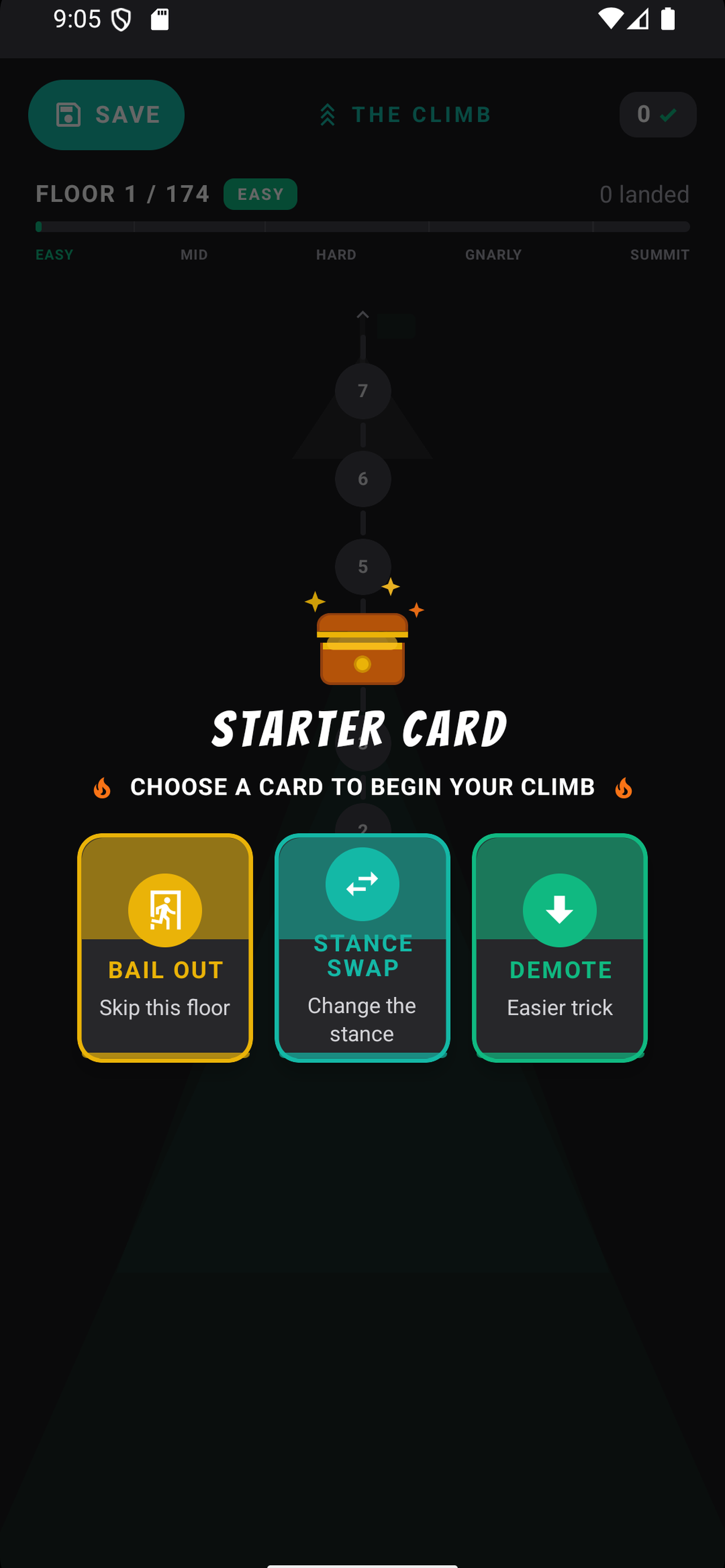
Sketchy leans on animation heavily. Twelve Lottie animations are bundled into the app, there's a custom animated splash on top of the static one, and Reanimated worklets drive the climb-cards flip, the spire-map progression, the floor-reward celebration, the run-result modal, and the firing-line generator. All the worklet-driven screens are useSharedValue and useAnimatedStyle end-to-end.
Quick mental model on why that matters. React Native runs on two main threads at runtime: the JS thread, where your bundle and React reconciliation live, and the UI thread, where the native renderer paints frames. Anything that needs to update a view at 60fps has to either run on the UI thread directly or cross to it without going through the JS thread, because a busy reconciler will starve the animation.
- app code & state
- React reconciliation
- sqlite / storage / fetch
- runOnJS callbacks
- Fabric layout + paint
- native gesture routing
- view updates
- functions marked 'worklet'
- useAnimatedStyle bodies
- useDerivedValue
- gesture-handler worklets
- shared values
Worklets are how Reanimated keeps an animation rendering at 60fps even when the JS thread is busy. The body lives in the worklet runtime; the UI thread paints; the JS thread doesn't have to be involved per frame.
Reanimated's answer is worklets: small JS functions the library lifts off the JS thread and runs on a second JS runtime that lives on the UI thread. The body of useAnimatedStyle, useDerivedValue, or any function you mark with the 'worklet' directive runs there. The JS thread is only involved at setup, and at the points where you cross back explicitly via runOnJS.
Reanimated 3 shipped that runtime baked into the library. Reanimated 4 extracted it into a standalone package called react-native-worklets. Same idea, less overhead per worklet at registration time, faster cold start of any screen using Reanimated, and the runtime can now be shared with other libraries that need worklet semantics. Margelo's react-native-worklets-core is a parallel runtime originally built for vision-camera and Skia, which fills a similar role for those libraries. On Sketchy the practical effect is that the climb-cards flip and the firing-line generator keep their frame budget even when the JS thread is busy hitting sqlite or resolving the next trick. That gap is most visible on Android, where the JS thread is more easily starved than on iOS.
@marceloterreiro/flash-calendar
The journal calendar is Flash Calendar, which is a Flash List-backed replacement for the older react-native-calendars. It renders instantly, supports per-day badges (which Sketchy uses to mark days with sessions), and month-switching feels native without any extra wrapping.
expo-sensors and expo-haptics
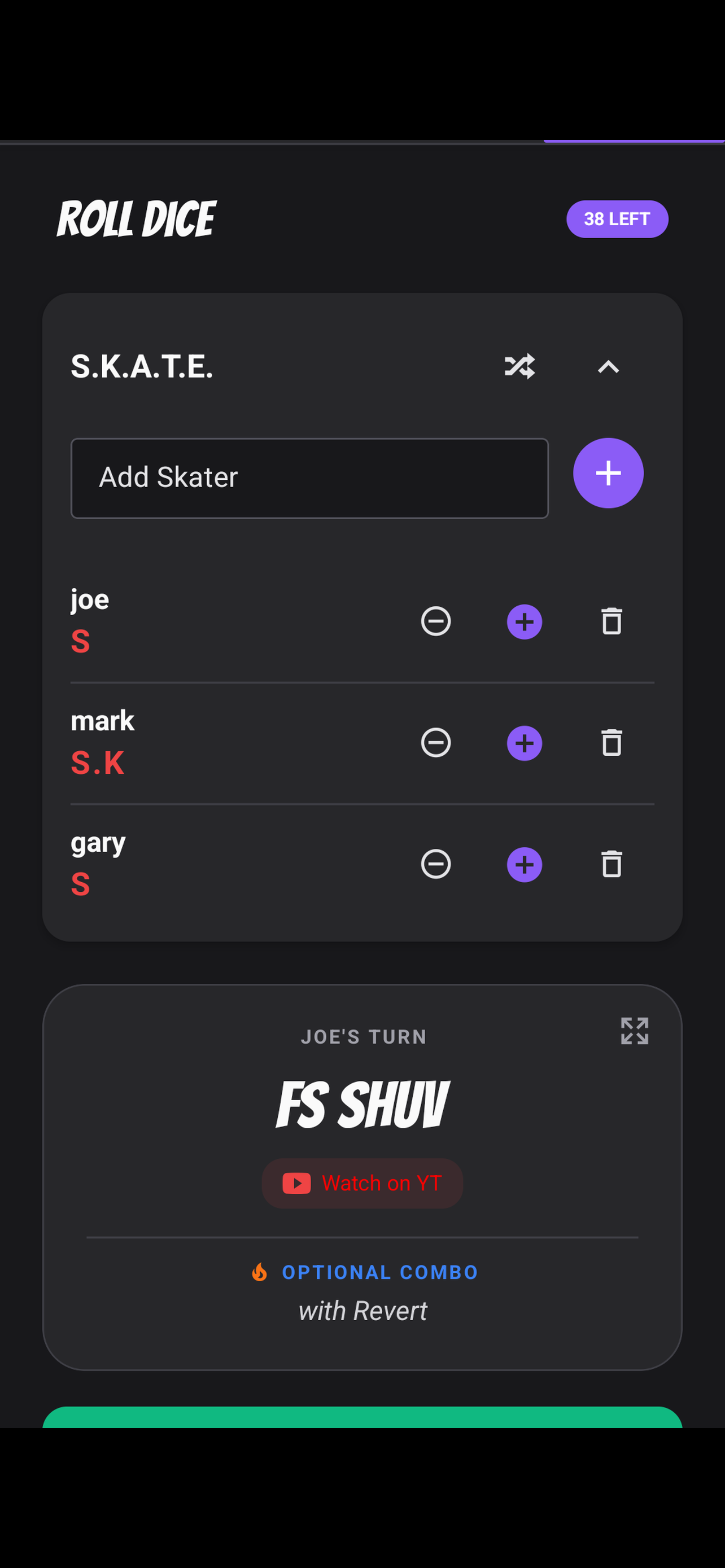
Shake-to-roll is the small detail that turned the dice screen from "fine" into "fun." It's DeviceMotion from expo-sensors sampled every 100ms with a 1.5-second debounce, so a bumpy car doesn't trigger a roll, and an expo-haptics impactAsync with the heavy style fires on success. Two tiny libraries, two lines of config in app.config.ts, and the screen feels like a native dice app instead of a React Native one 🔥.
expo-notifications for the daily challenge
Sketchy has a daily-trick notification that fires at 9am if the user has opted in. The trick of the day is deterministic from the local date, which means the notification body and the in-app challenge always match without any server coordination:
1await Notifications.scheduleNotificationAsync({2 content: {3 title: "Today's challenge: ${trick.name}",4 body: trick.description,5 },6 trigger: {7 hour: 9,8 minute: 0,9 repeats: true,10 },11})
The trick is drawn from a curated CHALLENGE_TRICKS pool, not the full combinatorial pool the dice and firing-line screens pull from. That separation matters: the daily challenge wants to be something you can actually try.
Hand-picked beginner-to-intermediate tricks people can actually try today.
Every flip, grind, slide, and combo permutation, down to "Switch Inward Heel Body Varial Triple Flip" territory.
The schedule is set once when the user opts in, repeats forever, and survives restarts. The two places server-side cleverness would actually help are per-user trick personalisation and pushing curated content updates (UK skate events from Skateboard GB, contest results, news) through something like Iterable. Neither is on the roadmap yet, but both are server-only additions rather than reworks.
Fonts (goodbye Bangers)
Sketchy launched with Bangers, a comic-book style font with loads of personality, but the letters spill slightly past their own bounds, so any parent with overflow: hidden kept chopping the last letter off 🤦. I patched it with extra padding in the shared SkateText component for a while, then in 1.6.2 swapped it out for Space Grotesk, which is cleaner and easier to read, with Caveat for the handwritten notes in the journal. Both load from @expo-google-fonts and get bundled into the app, so there's no flash of the wrong font on first launch.
Maestro for the smoke tests
Sketchy's end-to-end tests are Maestro flows. Each major screen has a debug-*.yaml flow for navigating to it during local debugging, and a smoke-*.yaml flow for the regression check that asserts key elements are visible. The flows use deep links via the sketchy:/// scheme, which means a smoke test can open the app on a target screen without going through the login dance most apps need. Maestro tags (--include-tags smoke) keep the CI run scoped to the regression set rather than the slower debug flows.
Sentry, PostHog, RevenueCat
Sentry catches the crashes I haven't seen coming. PostHog (with session replay) is wired up so I can see how the flows are actually being used, which is the kind of thing you want even on a side project once real users are touching it. RevenueCat handles the in-app upgrade and abstracts away the App Store and Play Console receipt validation differences, which is a category of bug I'm happy to never debug myself. All three sit on free tiers for an app this size.
Why it feels fast
The thing I'm happiest with in Sketchy is how quick the whole app feels, from opening it to the animations to how fast taps respond. There's no single trick behind that, it's lots of small decisions adding up, and the New Architecture is what makes most of them possible.
Cold start
Cold start on Sketchy feels close to native, and a few choices stack up to make that possible. Hermes ships pre-compiled bytecode in the bundle, so the JS engine is parsing instructions rather than parsing source. The JSI layer in the New Architecture means the first round of native module calls (location permission, sqlite handle, theme detection) skip the JSON-bridge tax. Plenty of apps are still paying that tax today, mind you, because the architectural rollout only really got teeth from RN 0.82 onwards and a lot of production apps and dependencies haven't caught up yet. expo-splash-screen shows a native splash before any JS has run at all, so the user sees something immediately, and the splash hides the moment the first frame is ready rather than at a fixed timeout.
On top of that, assetBundlePatterns: ['**/*'] in app.config.ts bundles every Lottie animation, every icon, and every font into the app binary. Lottie pays off particularly well here: each animation is a vector JSON file, so most of Sketchy's sit under 50KB and even the chunky full-character ones rarely cross half a meg, a tiny fraction of what an MP4 or GIF doing the same job would cost. The result is no network round-trip for a font or an animation on first launch, which is the most visible cause of the laggy first-impression people associate with cross-platform apps and is almost always avoidable.
Animations
Every animation that matters in Sketchy runs on the UI thread, not the JS thread. Reanimated 4 with the new worklets-core runtime compiles animation bodies into worklets that the native side schedules directly, so even when the JS thread is busy resolving the next trick or hitting sqlite, the spire-map slide, the climb-card flip, and the run-result modal all keep their frame budget. react-native-gesture-handler sits on the same UI thread for touch routing, which means the gesture that triggers the animation doesn't have to wait for a JS turn either.
The other half of "feels fast" is haptics. Every important confirmation in the app fires Haptics.impactAsync the instant the action is committed, not when the screen finishes animating. A lot of feeling fast is just the app letting you know straight away that it got your tap, and a little buzz does that better than any amount of shaving milliseconds.
The hot path
The journal and the dice screens are the parts the app reads from and writes to most. Both of them go through the synchronous expo-sqlite API, so the read returns straight away and lands in React state in the same tick, without any async/await or JSON conversion in between.
On top of that, the React Compiler's auto-memoisation removes the cascading re-renders that used to be the silent fps-killer in React Native lists. Flash List handles the actual rendering, and its 2.x release recycles cells more aggressively than the 1.x line, which is the reason a long journal history stays smooth on Android in a way it rarely does with FlatList doing the same job.
On lists with any real row count, swapping FlatList for @shopify/flash-list usually gives a bigger list-perf bump than any of the FlatList tuning knobs combined, for less effort. If you've got an RN app with a list that feels sluggish (especially on Android), it's the first change I'd try before reaching for deeper optimisations.
One honest disclaimer about the speed story
To be fair, Sketchy is light on network calls. The journal is local sqlite, the dice and trick logic is in-memory, the daily challenge is deterministic from the date, and the only times the app actually hits the wire are the map tiles (the spots themselves are bundled into the app now), the "Load live" button on the map, the place search, the weather API (which is non-blocking, the rest of the home screen renders without waiting on it), and the occasional Sentry / PostHog / RevenueCat ping. A lot of apps that feel slow are really just waiting on the network, and Sketchy mostly dodges that by not having much network to wait on. Put a chatty backend behind the same setup and I'd be fighting the same loading spinners as everyone else.
Conclusion
Looking back, very little of the work on Sketchy was plumbing. Expo SDK 55, EAS and the New Architecture mean most of the decisions that used to eat days are now defaults, so I spent almost all of my time on the parts that actually shape the product: the dice mechanics, the trick climber's progression curve, the journal data model, the shake-to-roll feel, the Bangers font clipping fights 🤦, curating the 8,000-plus trick catalogue, and (the rabbit hole that ate the most evenings) modelling skate stances and flow properly so the generators know what comes next. The Firing Line has to understand that landing a BS 180 kickflip on flatground puts you in switch, so the next trick in the line should be a switch trick like a switch kickflip, not a random regular-stance one. Skaters will get it 😉
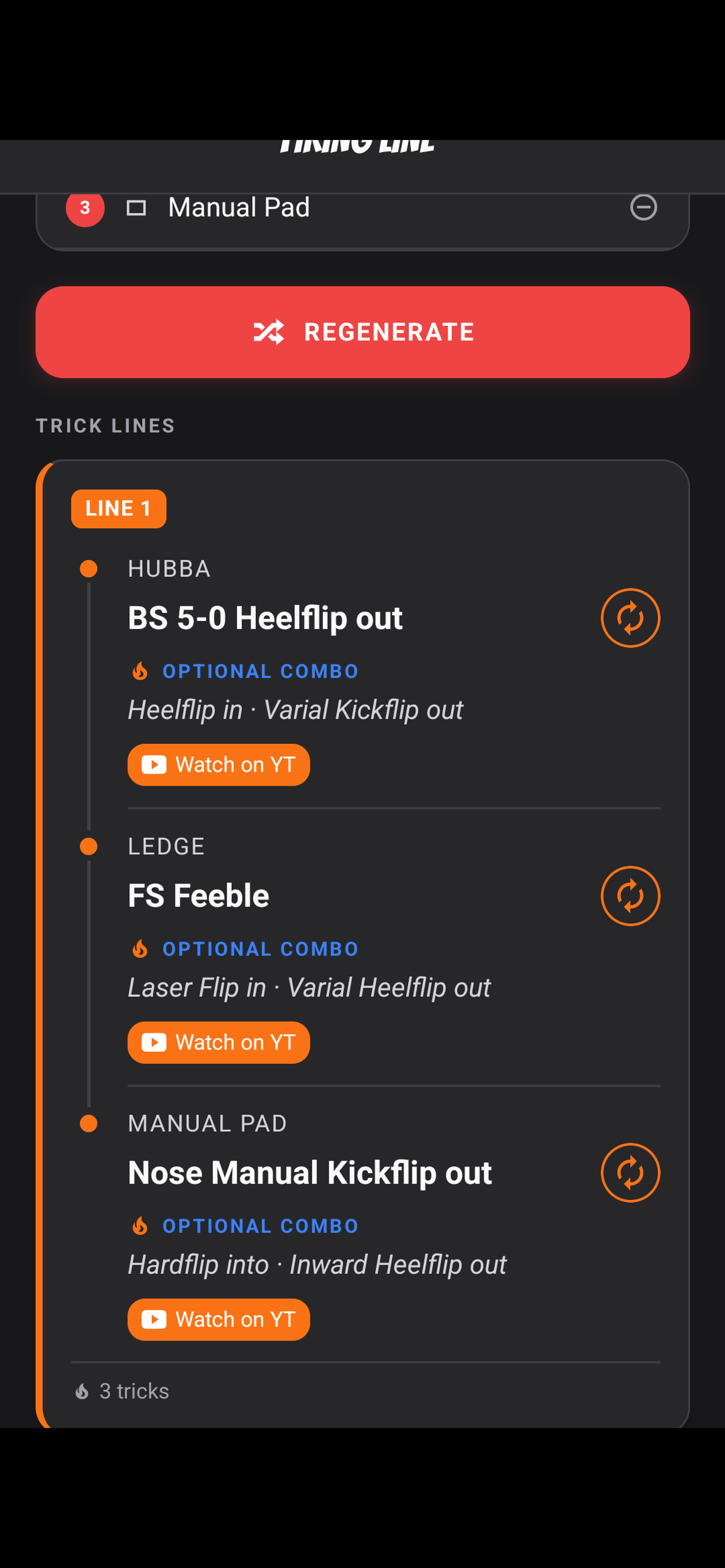
The pieces I'd recommend without reservation are expo-sqlite for any local persistence past "a few key-value pairs", EAS Update for shipping JS-only fixes without a store re-review, and Reanimated 4 for any animation that would feel cheap on the JS thread. The pieces I'd think harder about on a bigger app are the React Compiler (still flagged experimental), AsyncStorage as the catch-all for small state (it's fine, but MMKV is faster if you're storing a lot of small values), and the Leaflet-in-a-WebView map 🗺. At launch the map was the part of Sketchy I was least happy with, but preloading every spot from a JSON file fixed most of that, and it's still free. Google Maps would look nicer, but it's pay per load, so it can wait until the app is paying for itself.
If you've been holding off on a mobile side project because it feels like a lot to learn, the gap between having an idea and being on both stores is a lot smaller than it used to be. I'd start with a fresh Expo project pointed at EAS and see how far you get in a week.
Thanks for reading! Time for one more?
<LiveProvider code={code}><LiveEditor /><LivePreview /></LiveProvider>
🧪 Bye CodeSandbox, hello react-live
04 Oct 2026 • 📖 2 min readSwapped the broken CodeSandbox embeds for react-live, so the code demos now run right here on the site.
const intervalRef = useRef(null)const resetGame = useCallback(() => {clearInterval(intervalRef.current)}, [])
🕹️ Building 'Simple' React Games
21 Apr 2026 • 📖 19 min readWhat I learned refactoring two browser games: grouping state, useReducer, stale closures, timer cleanup, render-time randomisation bugs, and replacing three intervals with one rAF loop.