⚙️ JS Runtime Env
Overview
This article is part 1 of 2 on the JavaScript Runtime Environment. In this article, we will be looking at the event loop interactions with the call stack and message queues.
The Runtime Environment
Take a moment to study the diagram below. It maps out the core components inside the JavaScript Runtime Environment:
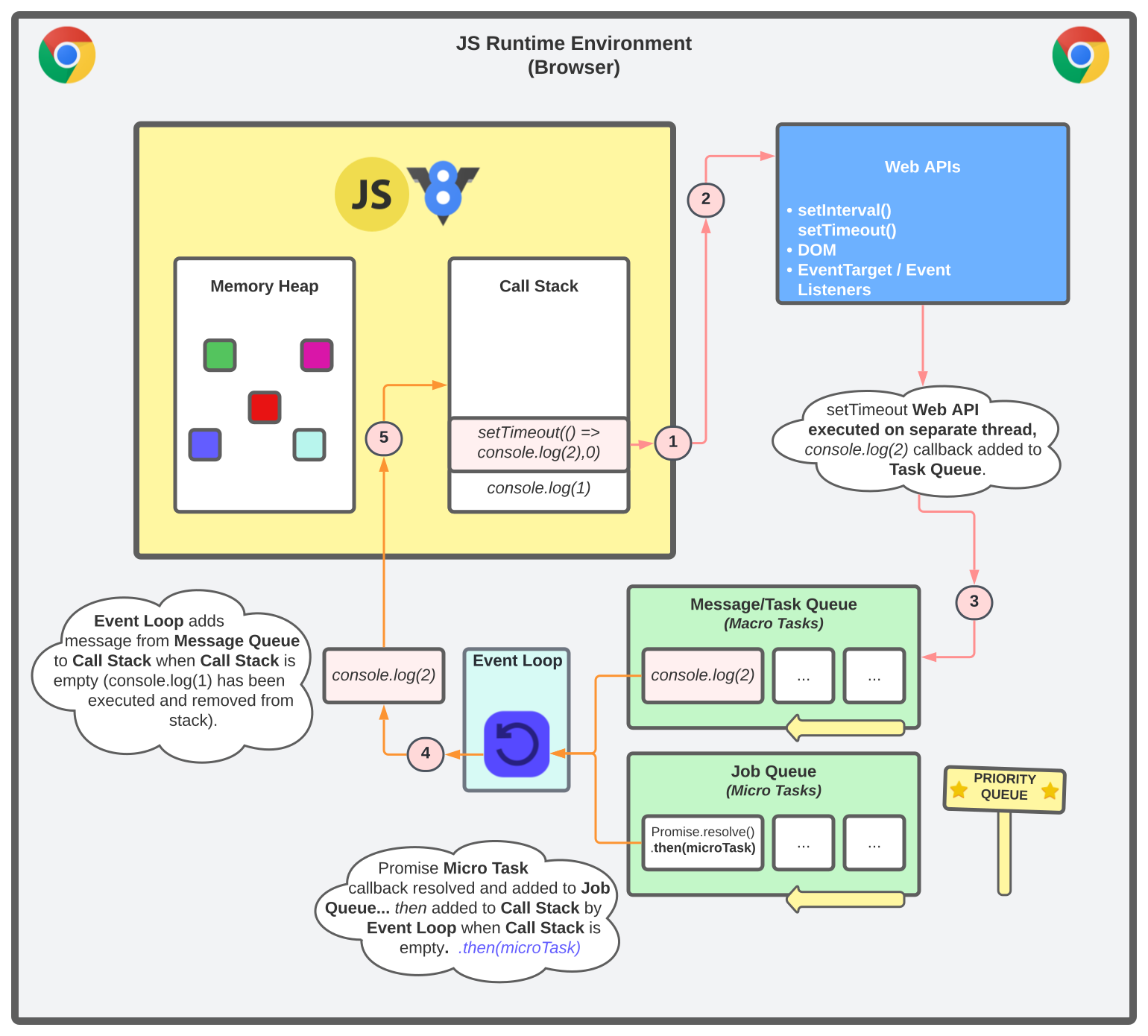
We won't cover memory allocation or memory management here. The focus is on Event Loop interactions with the call stack and message queues.
Call Stack
The call stack runs inside the host environments JavaScript engine, in this case we are talking about the browser. The stack keeps track of our current execution context. It operates using the LIFO principal (Last in, first out).
When a script is first executed the JavaScript engine will create a global execution context and push it onto the call stack. The next function will be added to the stack, executed, and removed if everything inside the context of that function has finished executing/run to completion.
Any nested function calls will also be added to the stack and executed. This process will continue until the end of the chain is reached. Once all functions have been executed and run to completion, each one will be removed until the stack is empty.
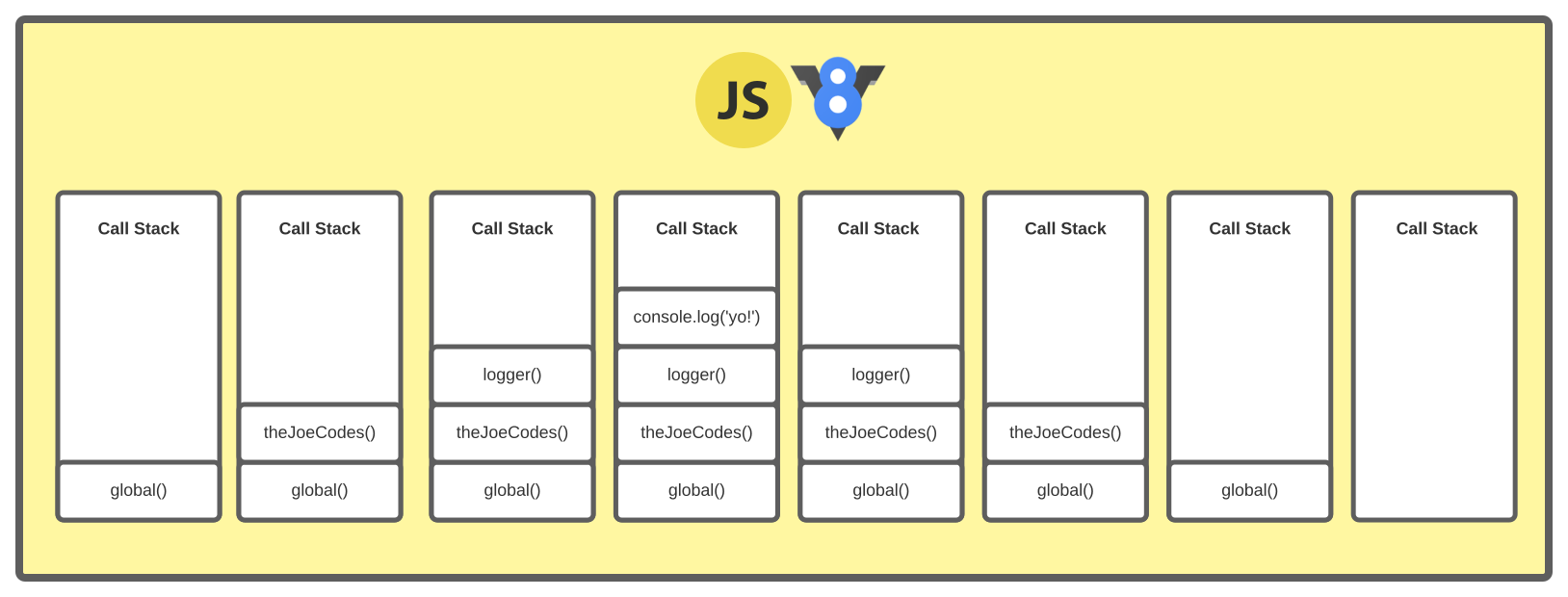
I've created a diagram to show the stages of the Call Stack when executing the snippet below.
1const logger = () => {2 console.log('yo!')3};45const theJoeCodes = () => {6 logger()7};89theJoeCodes()
Exceeding Max Stack Size
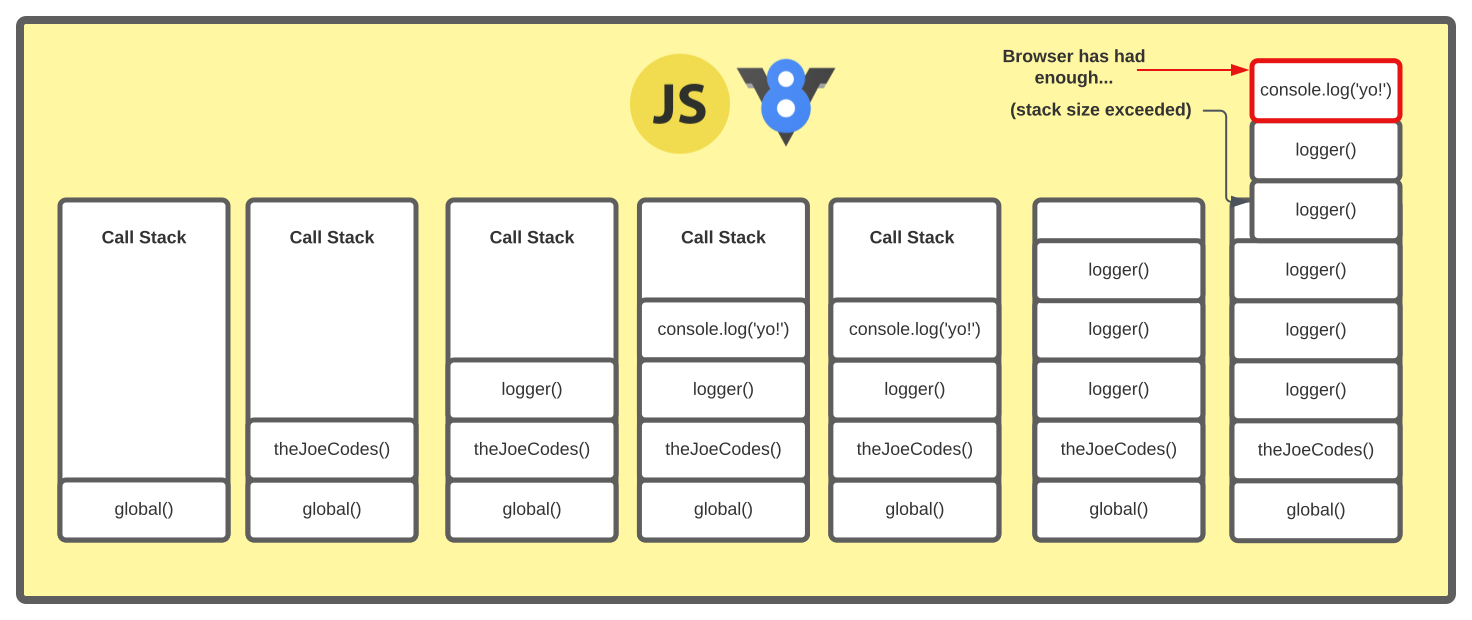
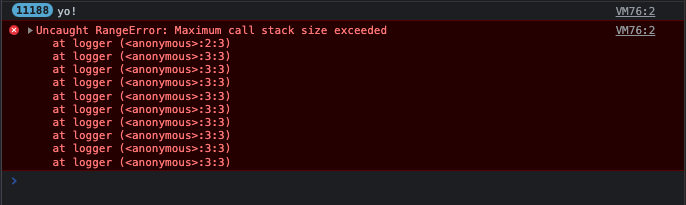
If you accidentally create an infinite loop that overflows the call stack size, you will end up encountering an error thrown by the browser Uncaught RangeError: Maximum call stack exceeded. In the example below I've added recursion inside the logger to call itself over and over.
1const logger = () => {2 console.log('yo!')3 logger()4};56const theJoeCodes = () => {7 logger()8};910theJoeCodes()
Message Queues (Task Queue & Job Queue)
A message queue is a list of messages/callbacks to be processed. A function is called for each message in a given queue. Message queues are managed by the event loop using the FIFO principle (First-in, First-out) for each message (oldest first). Messages are added to the callback queues using Array.prototype.push() and removed using Array.prototype.shift().
Task Queue
It's a common misconception there is only one message queue (also referred to as the callback queue) inside JavaScripts runtime environment. This single message/callback queue referred to is almost always the task queue, there is, however, also a job queue for microtasks.
The task queue manages macrotasks such as setTimeout() and setInterval().
Job Queue
The Job Queue manages microtasks like promises.
The Job Queue was introduced as part of the ES6 spec to allow the result of an asynchronous function to execute as soon as possible, rather than being added to the end of the call stack.
Between macrotasks and microtasks across both message queues, the event loop may pick up a queued render task. The event loop prioritizes microtasks in the job queue over macrotasks in task queue.
Macrotask vs Microtask - Priority
When the call stack is empty and there are no job queue messages that need priority, messages are removed from the task queue by the event loop and added as a new stack frame onto the call stack. Once the call stack is empty, if another message exists in the task queue the same process will occur. Let's look at the possible queue scenarios:
- A synchronous operation is encountered in the current execution context, added to the callstack, executed and removed. Task and job queues are not needed for scheduling.1// Execution start23console.log('🦄');45// Call Stack: console.log('🦄');67// synchronous operation added to callstack, executed and removed.89🦄 // unicorn logged
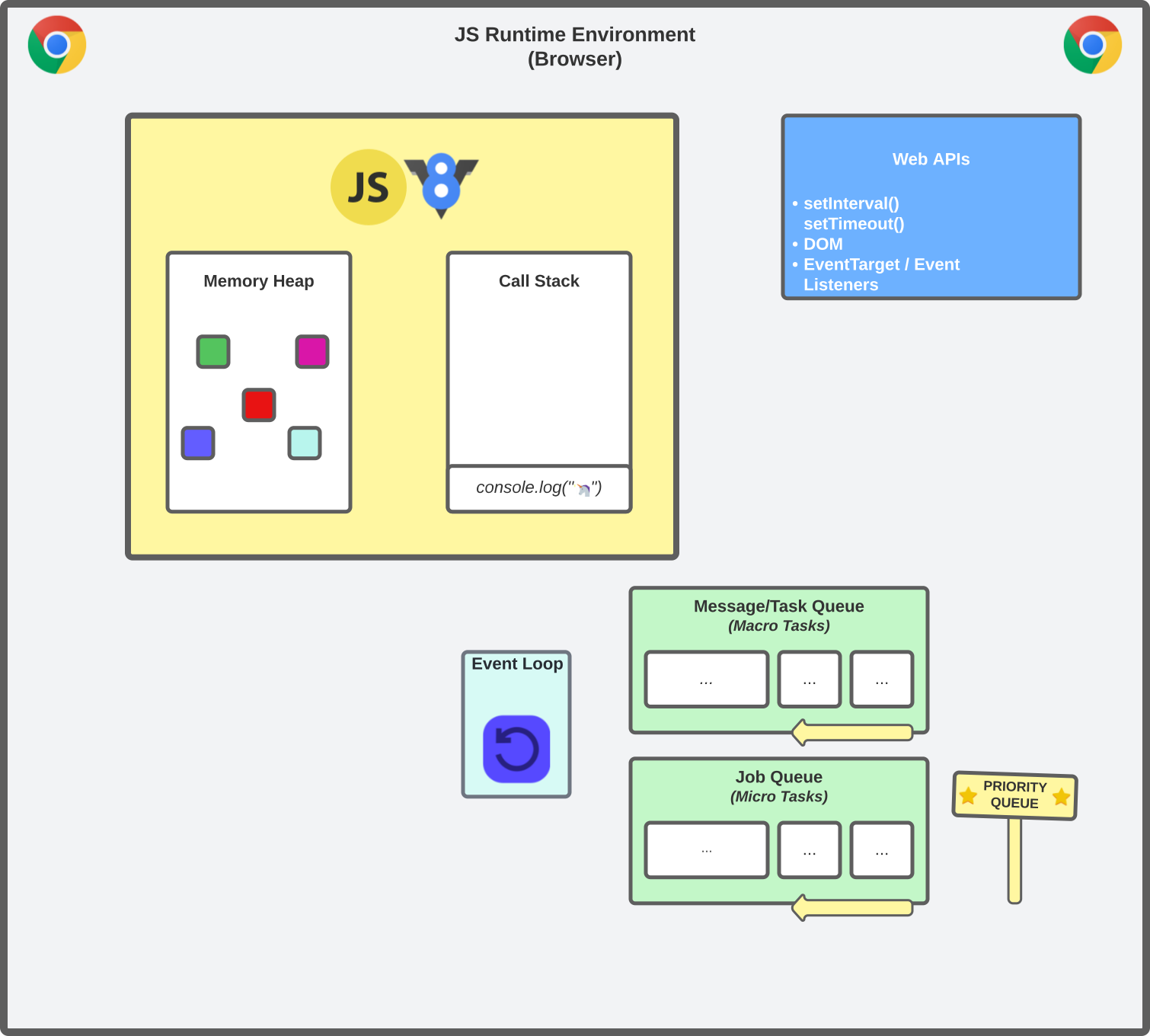
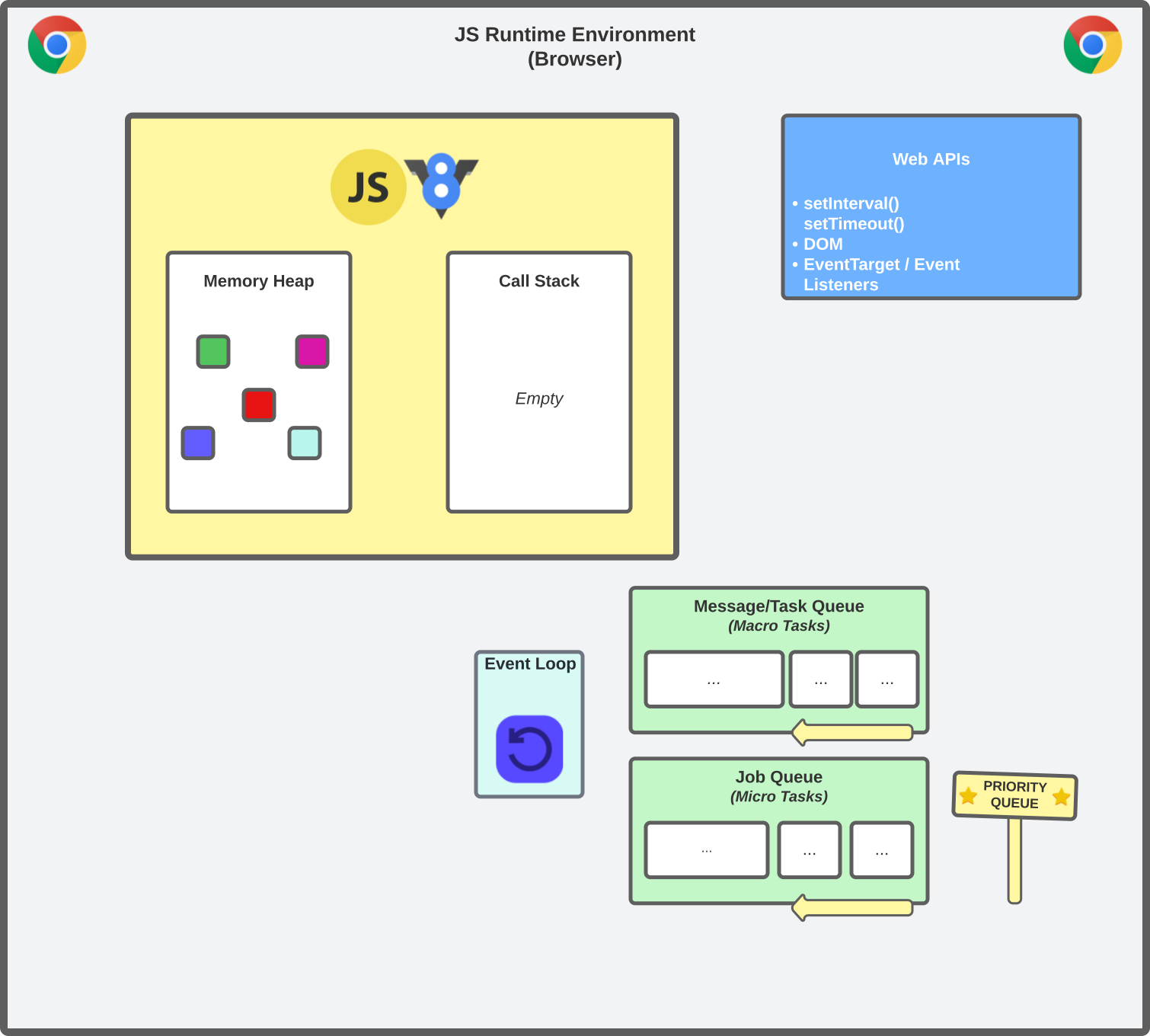
- A macrotask has been added to the task queue from a web api callback. The call stack is currently empty and no microtasks are queued in the priority job queue. The event loop picks up the macrotask from the task queue and adds it to the call stack.
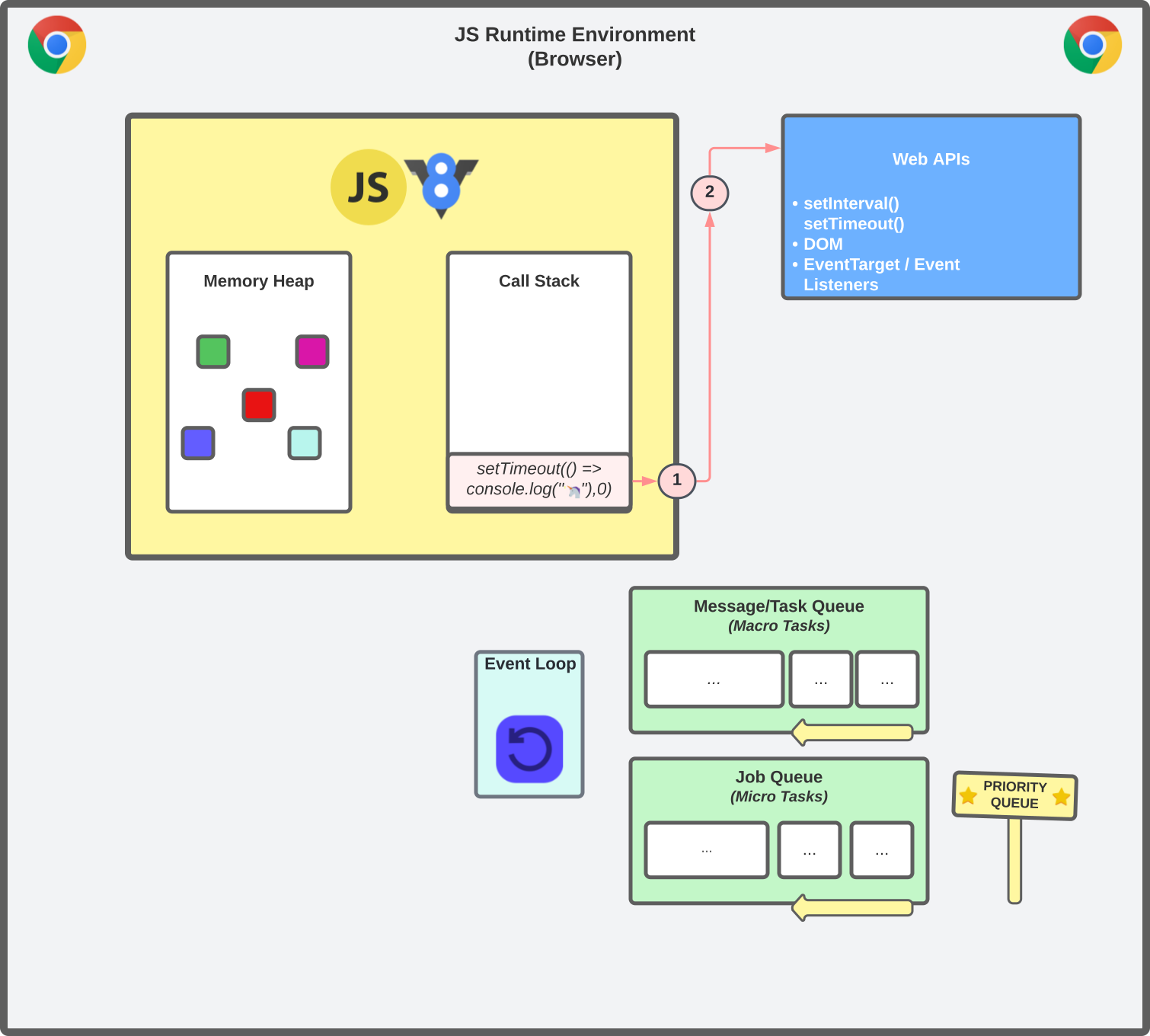
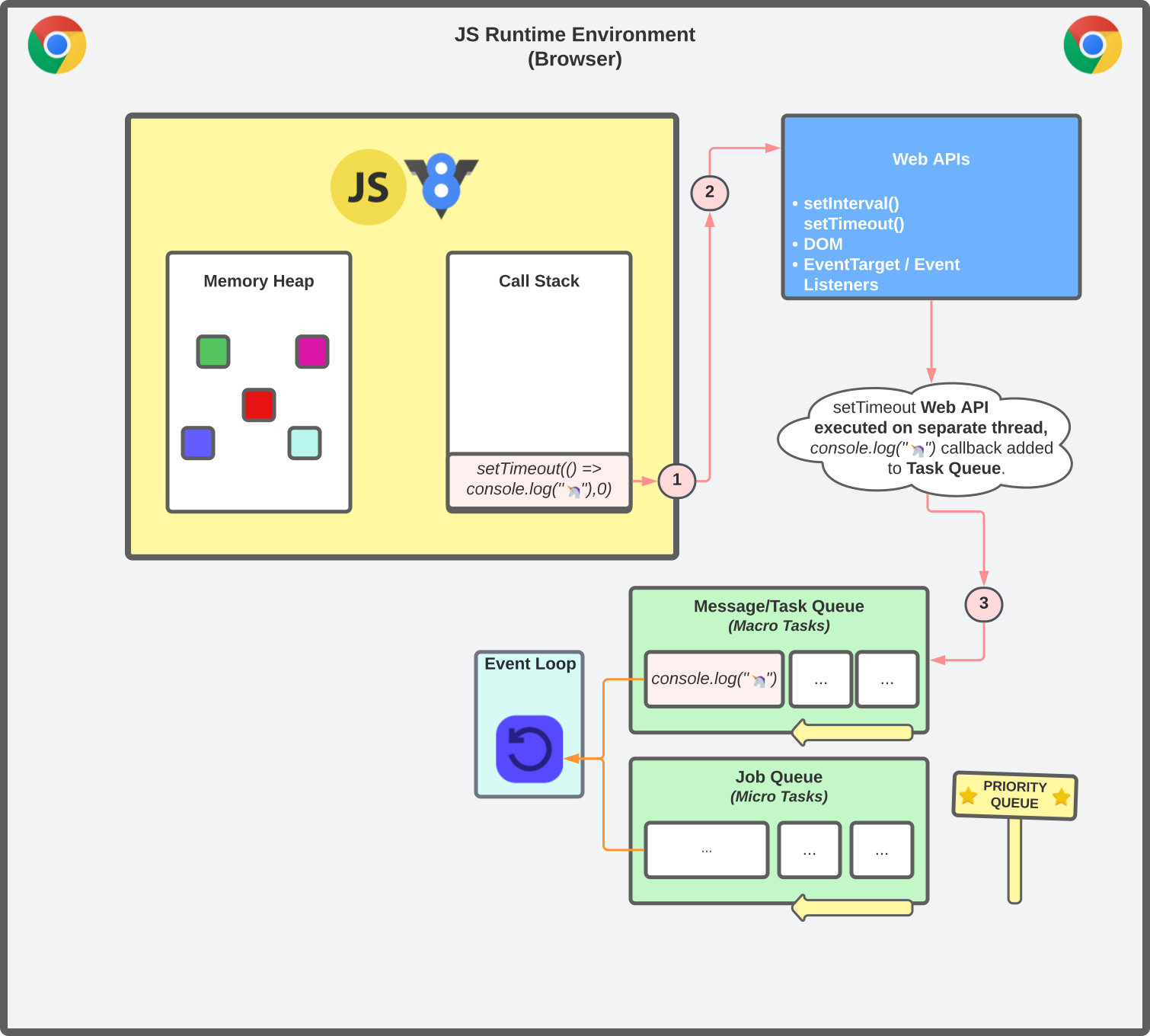
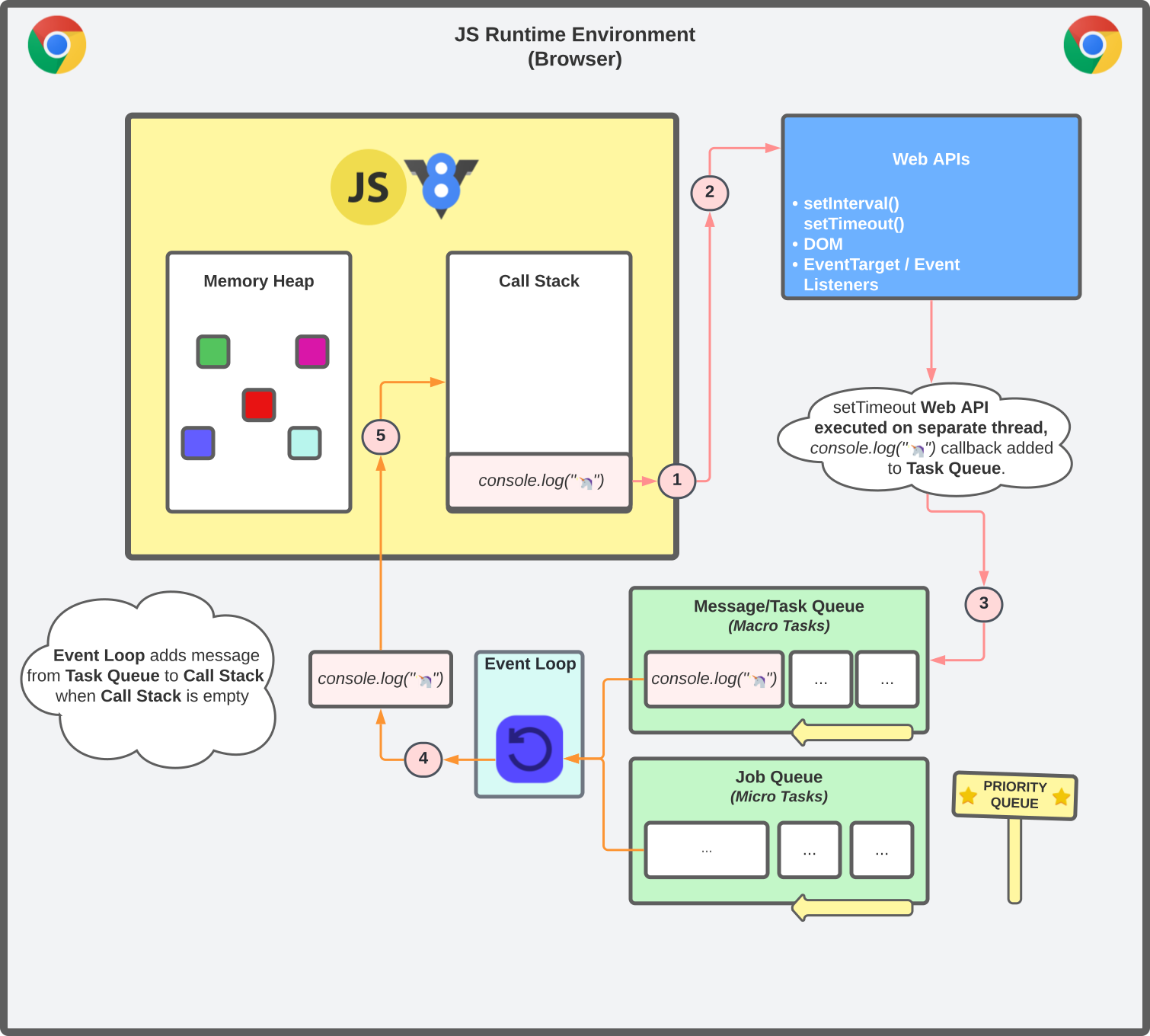 1// Execution start23setTimeout(() => console.log("🦄"), 0))45// Call Stack: setTimeout(() => console.log("🦄"), 0))67// Web API run on separate browser thread8// Wep API callback adds console.log Macro Task to Task Queue910// Task Queue: console.log('🦄');1112// Nothing else in execution context1314// Event Loop picks up from Task Queue & adds to Call Stack1516// Task Queue: (empty)1718// synchronous operation added to callstack, executed and removed.1920// Call Stack: console.log('🦄');2122🦄 // unicorn logged
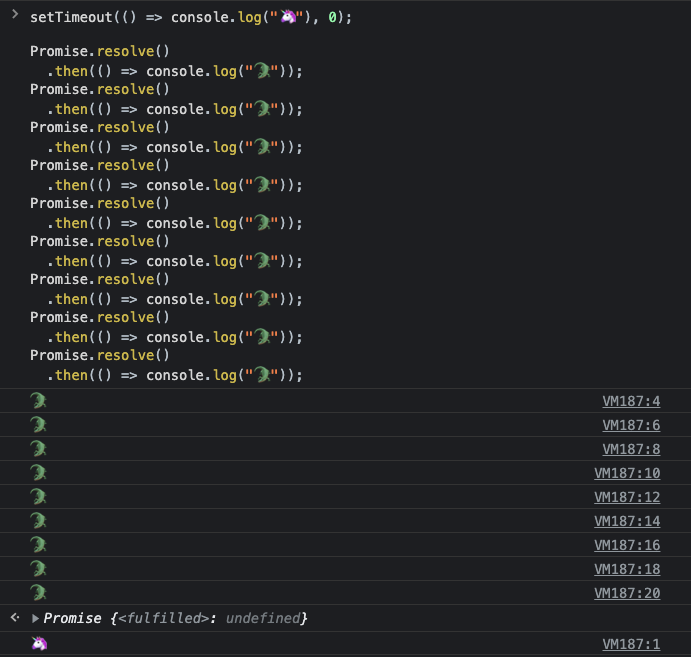
 - A macrotask has been added to the task queue from a web api callback. The call stack is currently empty, but a series of microtasks are queued in the priority job queue. The event loop prioritises ALL the queued micro tasks and adds each one to the call stack.
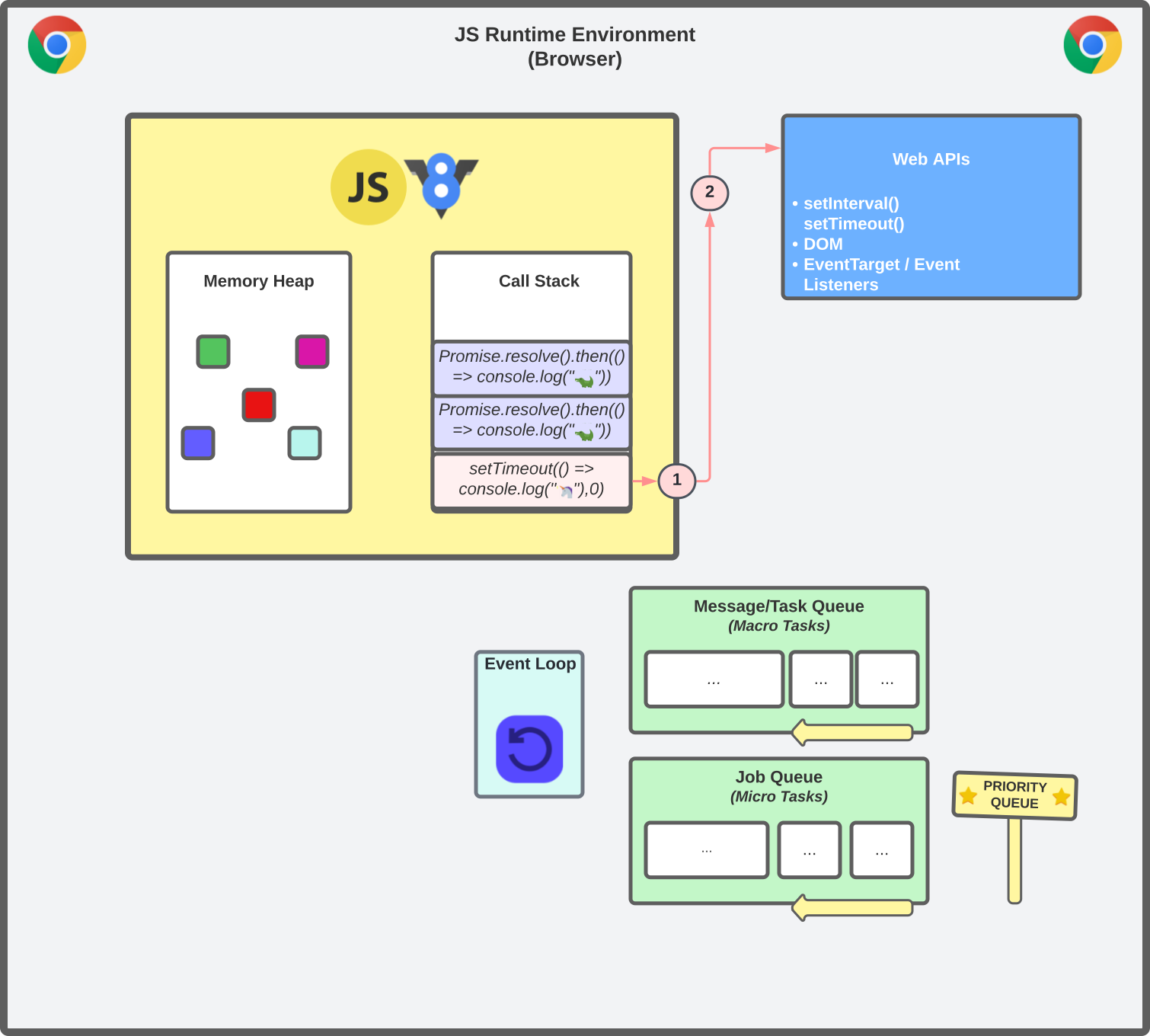
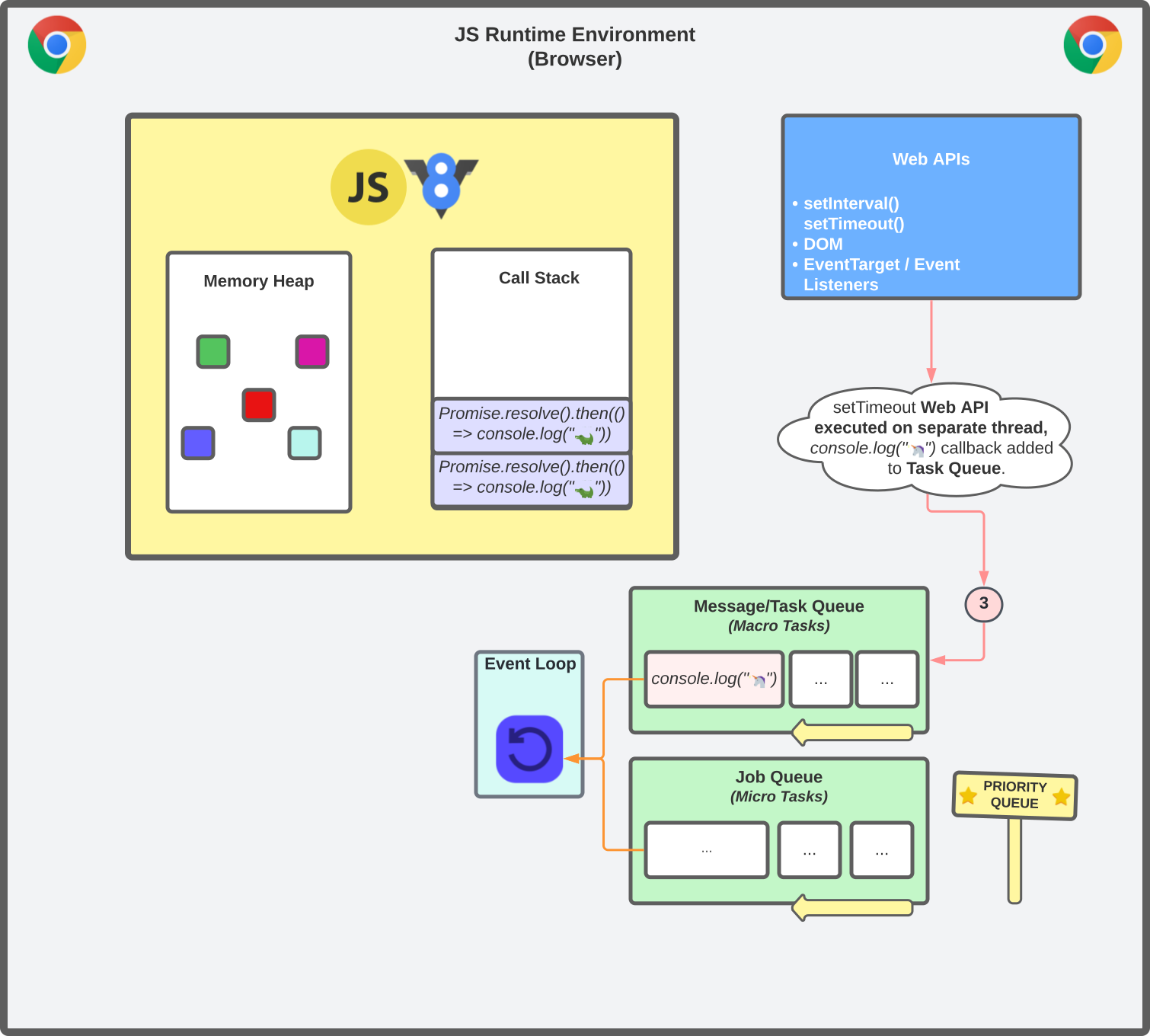
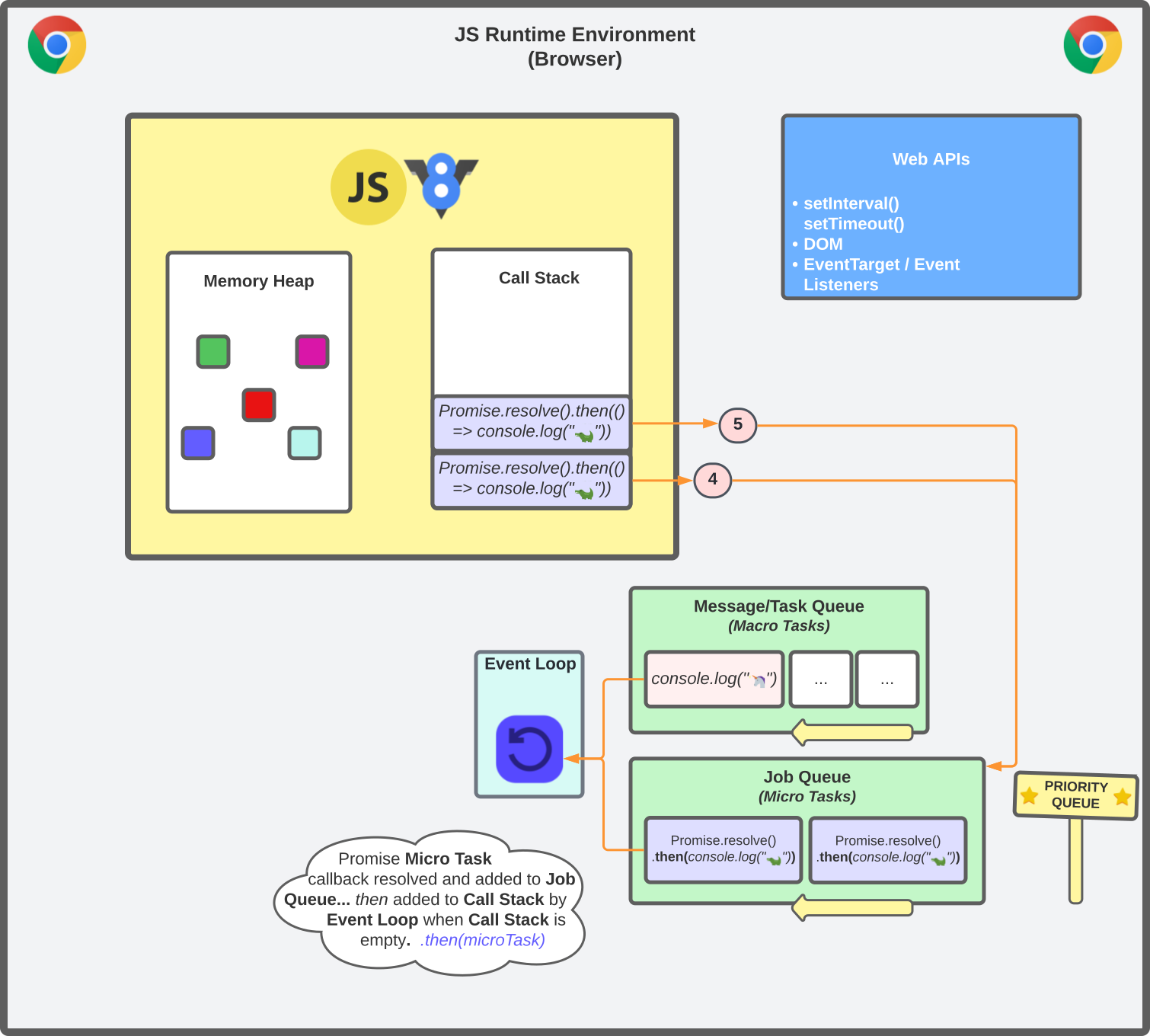
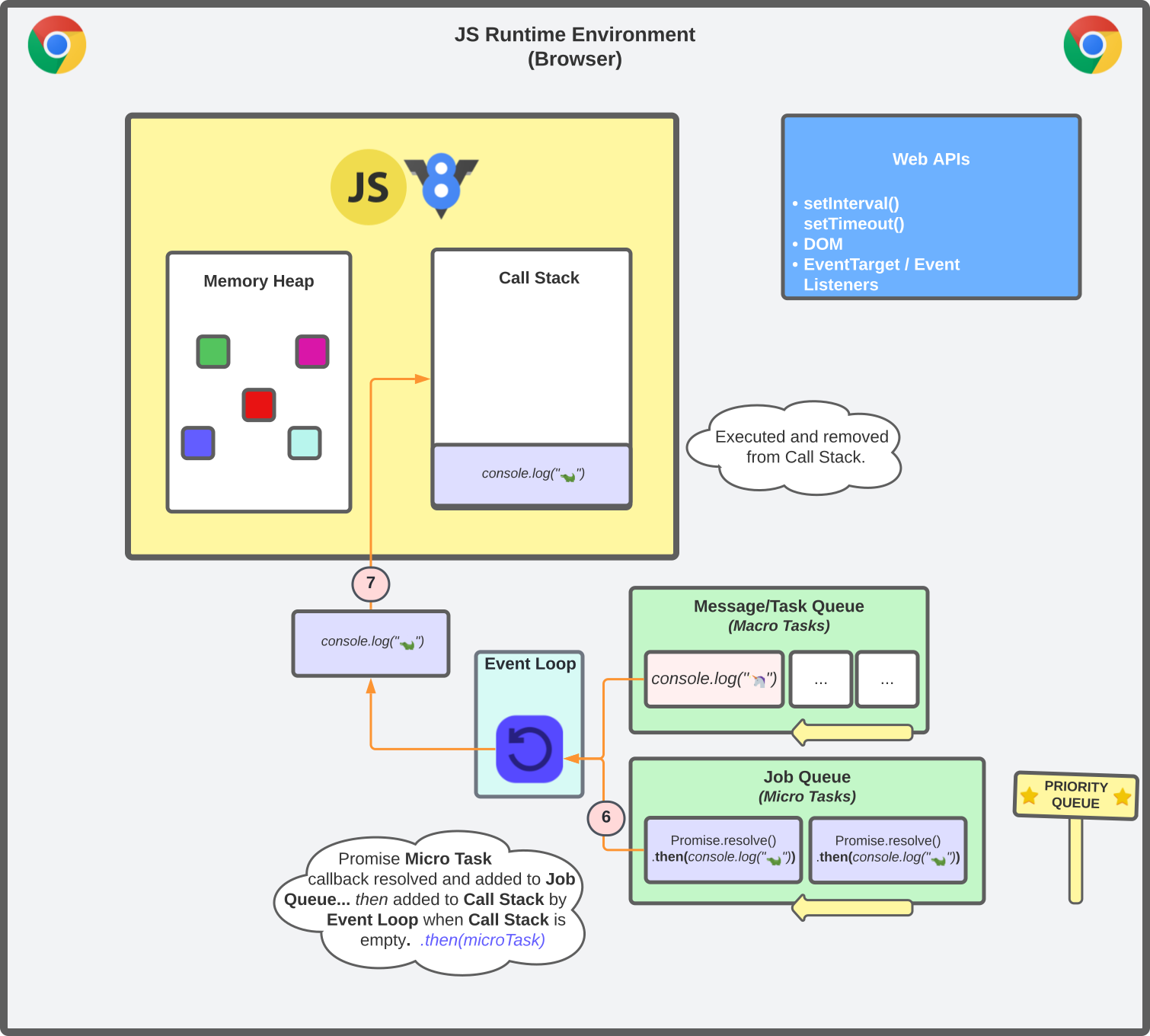
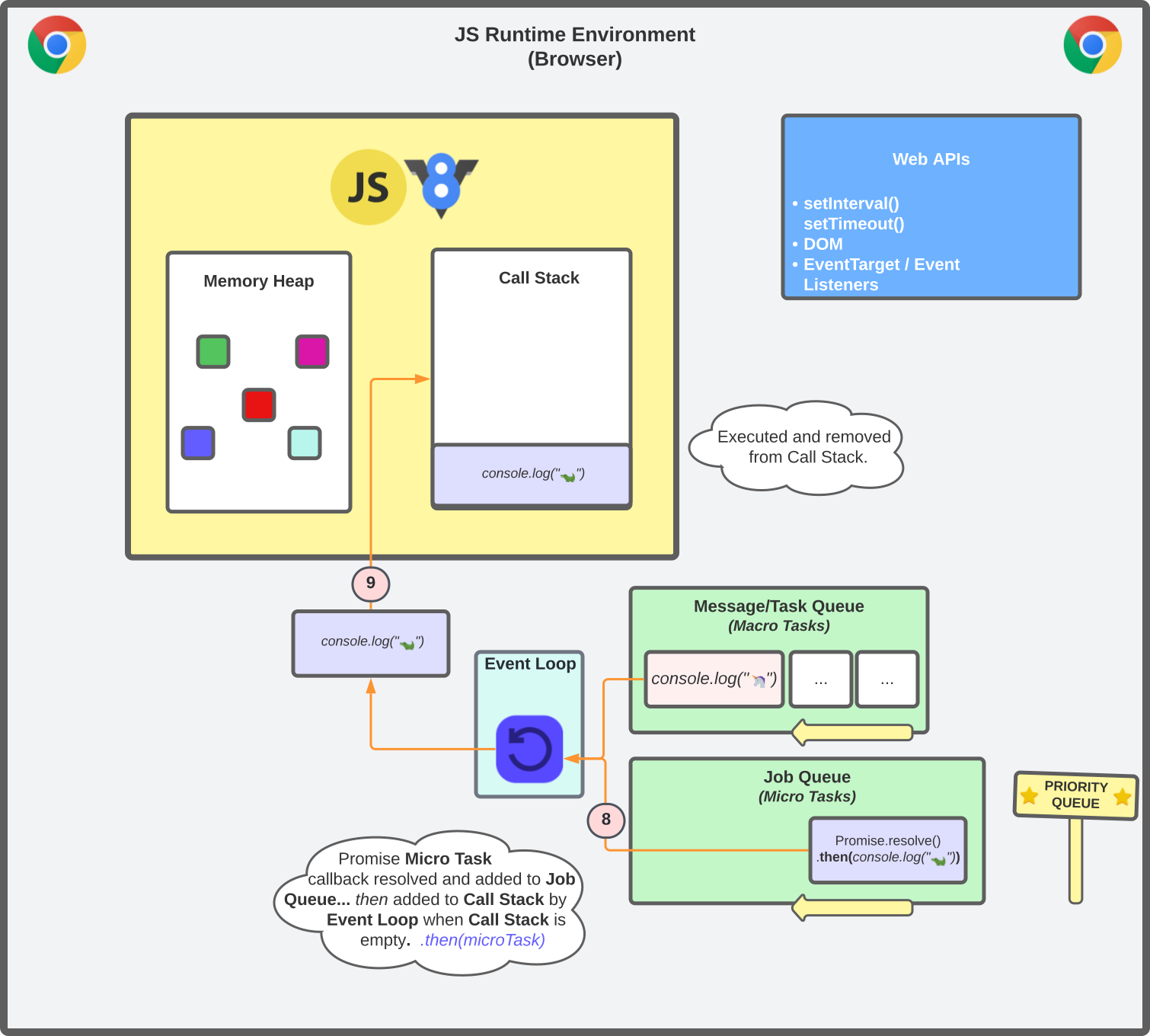
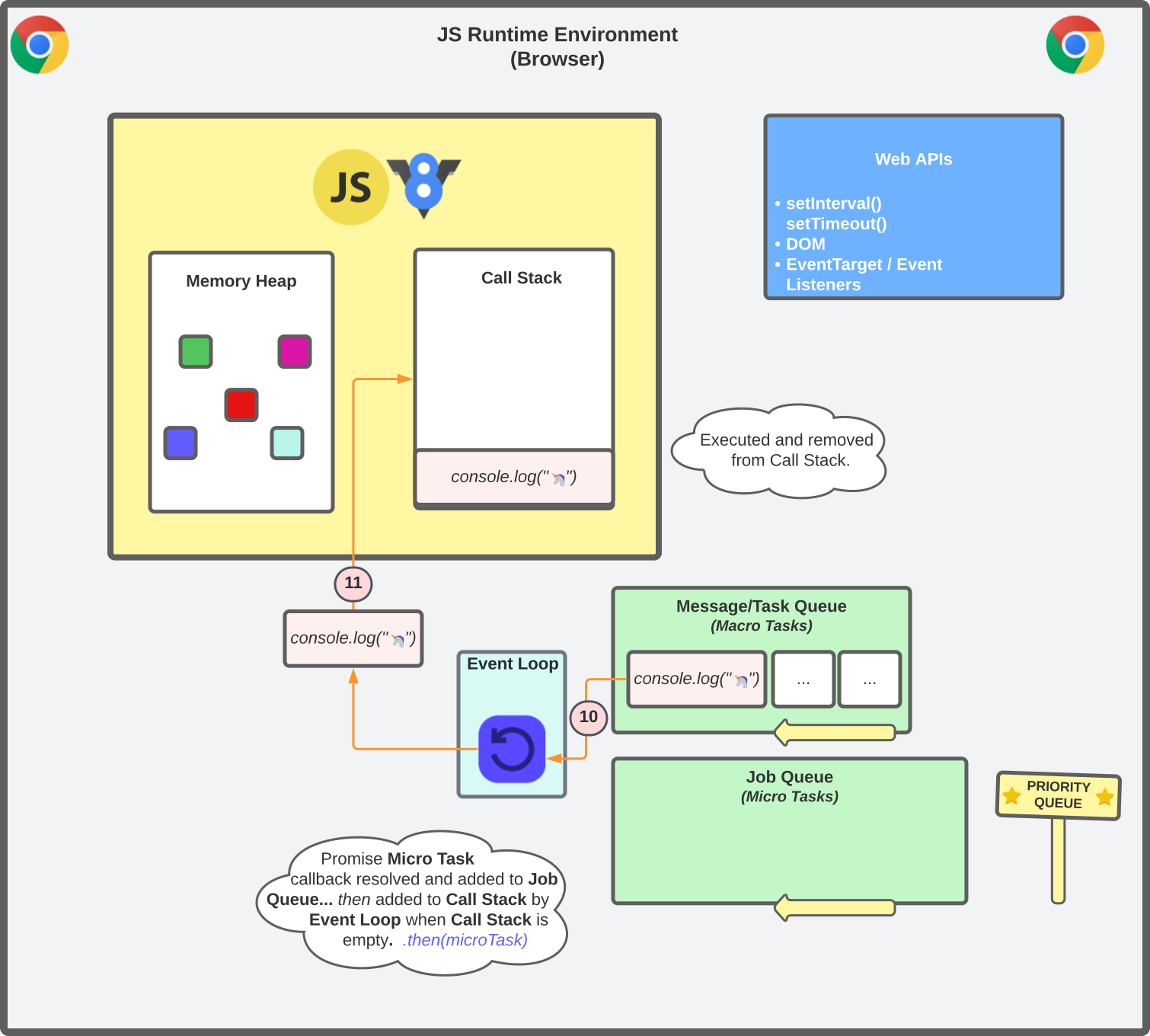 1// Execution start23setTimeout(() => console.log("🦄"), 0))45// Call Stack: setTimeout(() => console.log("🦄"), 0))67// Web API run on separate browser thread8// Wep API callback adds console.log Macro Task to Task Queue910// Task Queue: console.log('🦄');1112// Promises calls encountered next in the execution context1314Promise.resolve()15 .then(() => console.log("🐊"))16Promise.resolve()17 .then(() => console.log("🐊"))1819// Call Stack:20// Promise.resolve().then(() => console.log("🐊"))21// Promise.resolve().then(() => console.log("🐊"))2223// Promise function calls added to the priority Job Queue2425// Job Queue:26// Promise.resolve().then(() => console.log("🐊"))27// Promise.resolve().then(() => console.log("🐊"))2829// Task Queue: console.log('🦄');3031// Event Loop picks up from priority Job Queue & adds to Call Stack3233// Call Stack:34// .then(() => console.log("🐊"))35// .then(() => console.log("🐊"))3637// Job Queue: (empty)3839// operation added to callstack, executed and removed.4041🐊 // logged42🐊 // logged4344// Task Queue: console.log('🦄');4546// Event Loop picks up from Task Queue & adds to Call Stack4748// Task Queue: (empty)4950// synchronous operation added to callstack, executed and removed.5152// Call Stack: console.log('🦄');5354🦄 // unicorn logged
 - A macrotask exists on the task queue and the call stack is NOT empty. No microtasks exist in the priority job queue. The event loop keeps checking the call stack and message queues until it can pick up a message. Rendering tasks may be picked up by the event loop next when the call stack becomes free. Microtasks may appear on the job queue while the event loop was waiting to pick up the macrotask in the task queue. Microtasks will always be prioritised even if a macrotask has been waiting for a while.
Macro Task Vs Micro Job - Questions
Based on what we've learned so far, can you work out the log order for the animals in each question?
1console.log("🦁");23setTimeout(() => console.log("🦄"), 0);45Promise.resolve()6 .then(() => console.log("🐊"));78console.log("🐳");
Click on a button above to answer!
1console.log("🐳");23Promise.resolve()4 .then(() => setTimeout(() => console.log("🐊"), 0))5 .then(() => console.log("🦄"));
Click on a button above to answer!
The Event Loop
The event loop is responsible for monitoring the message queues and managing which callbacks are pushed to the call stack for execution.
If any callbacks are queued and the call stack is empty, the queued callback is added to the call stack. The event loop prioritises job queue messages over task queue messages. The event loop can be represented at a high level in the snippet below.
1while (queue.waitForMessage()) {2 queue.processNextMessage()3}
Blocking The Main Thread
The event loop guarantees that a task will run to completion before picking up any render steps like styles, layout, or painting.
Why is this important to know? Well, you'll often hear about blocking on the main thread in JavaScript. If you've encountered a scenario on a website where you can't type inside an input box, it's likely because some JavaScript code is blocking on the main thread or taking a long time to execute. Let's look at an example to understand blocking on the main thread.
1<input2onChange={() => {3 while (true) {4 console.log('infinite loop');5 }6}}7/>
- The user clicks on an input on the page to begin searching for content. A callback task is added to the task queue for the event loop to pick up, nothing is currently executing on the call stack so the event loop adds the task event to the call stack to be processed and executed. The input is currently focused for the user to begin typing. So far so good!
- Just as the user starts typing, a bug in our code creates an infinite loop running on the call stack.
- As the user is trying to enter data in the search input, the browser is scheduling event listener tasks onto the task queue and saying "Hey event loop, please run this event listener callback task. Also, at your next possible chance perform a render task to paint the UI with the character the user tried entering into the search input."
- The page is now in a 'frozen' state with an input that isn't responding to user updates. The event loop can't pick up any queued event tasks or render tasks until the code currently executing on the call stack is finished running to completion. This will never happen with our infinite loop bug!
- Eventually, the page crashes and becomes completely unresponsive.
Remember, JavaScript code runs to completion. Message tasks like render updates can't be picked up by the event loop and processed until the current task is finished.
When you click your mouse or try to highlight text on the browser, you're asking JavaScript to schedule a task onto the task queue for processing by the event loop and execution on the call stack.
Web APIs
Web apis are a series of apis we can interface with as part of the browser's JavaScript runtime environment. They exist within the browser, not the JavaScript engine.
Web apis run on separate threads inside the browser, but ultimately end up having to inject themselves back into the browser's single threaded runtime environment via the message queue, event loop, and call stack to be executed.
There is a large number of web apis in modern browsers to help us perform asynchronous tasks. Some common ones include:
- The DOM API to interact with the document object model, an in-memory, tree-structured logical representation of a document (nodes & objects).
- Scheduling based apis like setTimeout() and setInterval().
- Canvas api to create graphics, visualisations, and games on HTML canvas elements using JavaScript. Check out the arcade game I created using the Canvas Web API.
- The Fetch API for network requests to a server.
V8 Engine
The V8 Engine is an open-source C++ program by Google that focuses on performance for the execution of JavaScript code inside Node.js runtime and modern web browsers.
V8 itself is multi-threaded. The main thread is where our JavaScript compiles and executes, but there are additional threads for compiling, profiling, and garbage collection inside the browser.
"V8 compiles and executes JavaScript source code, handles memory allocation for objects, and garbage collects objects it no longer needs." (V8.dev)
The JavaScript Engine (V8) consists of two main components:
- Memory Heap
- Call Stack
V8 uses a JIT (Just-In-Time) compilation pipeline. Your code first runs through Ignition (the interpreter) which generates bytecode quickly, then Turbofan (the optimising compiler) kicks in for hot code paths that run frequently. This is why performance-sensitive loops get faster the longer they run.
Final Thoughts
In part two, we will focus on the JavaScript engines two main components, the memory heap and call stack in the context of memory allocation and memory management. See you in the next one!
Thanks for reading! Time for one more?
<SectionWithHeadingheadingID="about"headingTitle="About"headingLevel={2}/>
🍬 HTML Section Sugar
12 Apr 2022 • 📖 5 min read✏️ Updated 15 Mar 2026A lightweight React wrapper to create sections as document regions.
localStorage.setItem('thejoecodes', '123')window.addEventListener('storage', () => {console.log(localStorage.getItem('thejoecodes'))})
💾 Browser Storage
30 Jan 2022 • 📖 6 min read✏️ Updated 15 Mar 2026Client-side storage in the browser using cookies, local storage and session storage.